Healthcare Multi-Source Agentic RAG Platform: Part 1
Table of Contents
- Overview
- Environment Setup & Run/Stop
- System Flow
- How the Code Is Organized
- What Happens Step-by-Step, How Each Service Works (with key code)
- API Request Libraries: Python and JavaScript
- Quick Tips: Techniques Used with Applied Examples
Part 2 of this guide covers the LangGraph agentic core in depth, routing, RAG, GraphRAG, and every service the graph touches, plus a resource index of every doc in this repository.
Overview
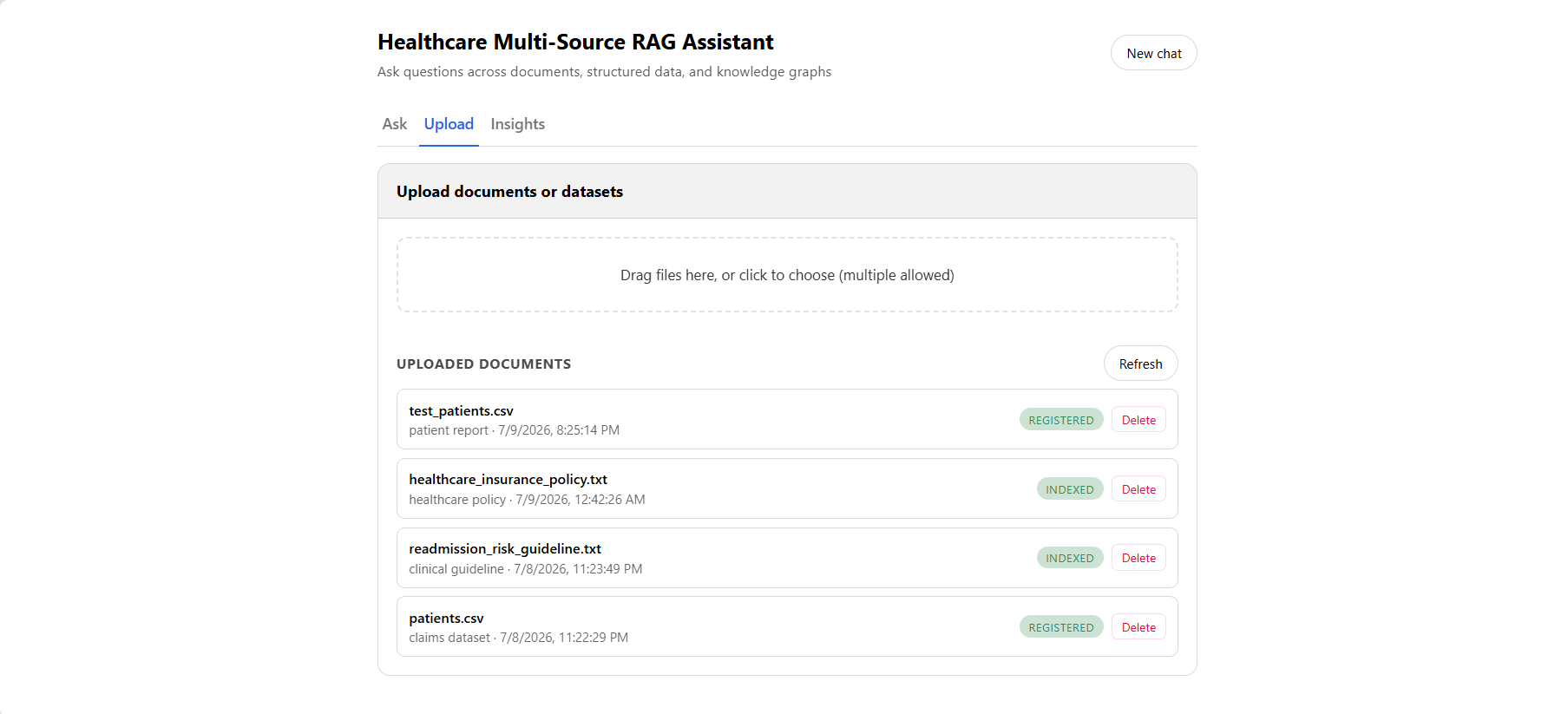
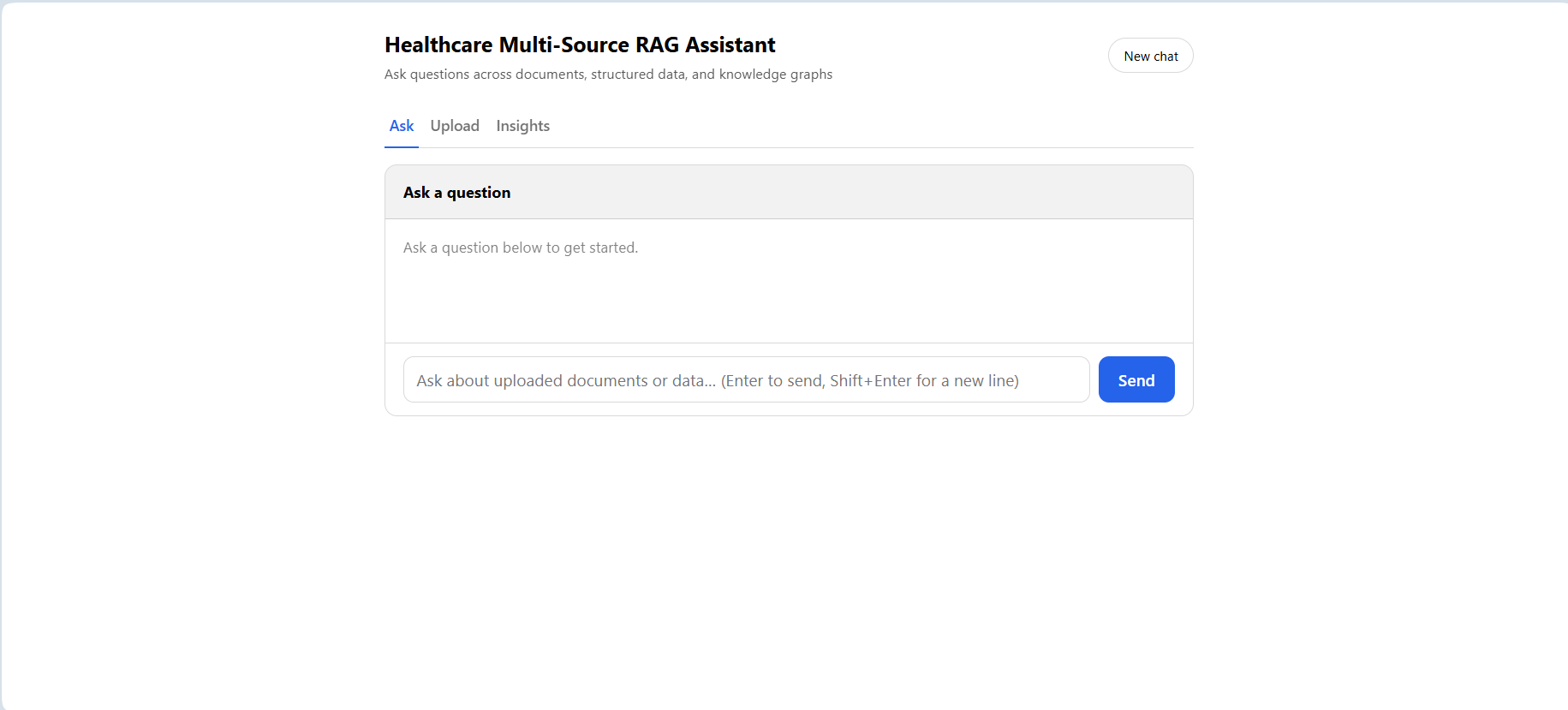
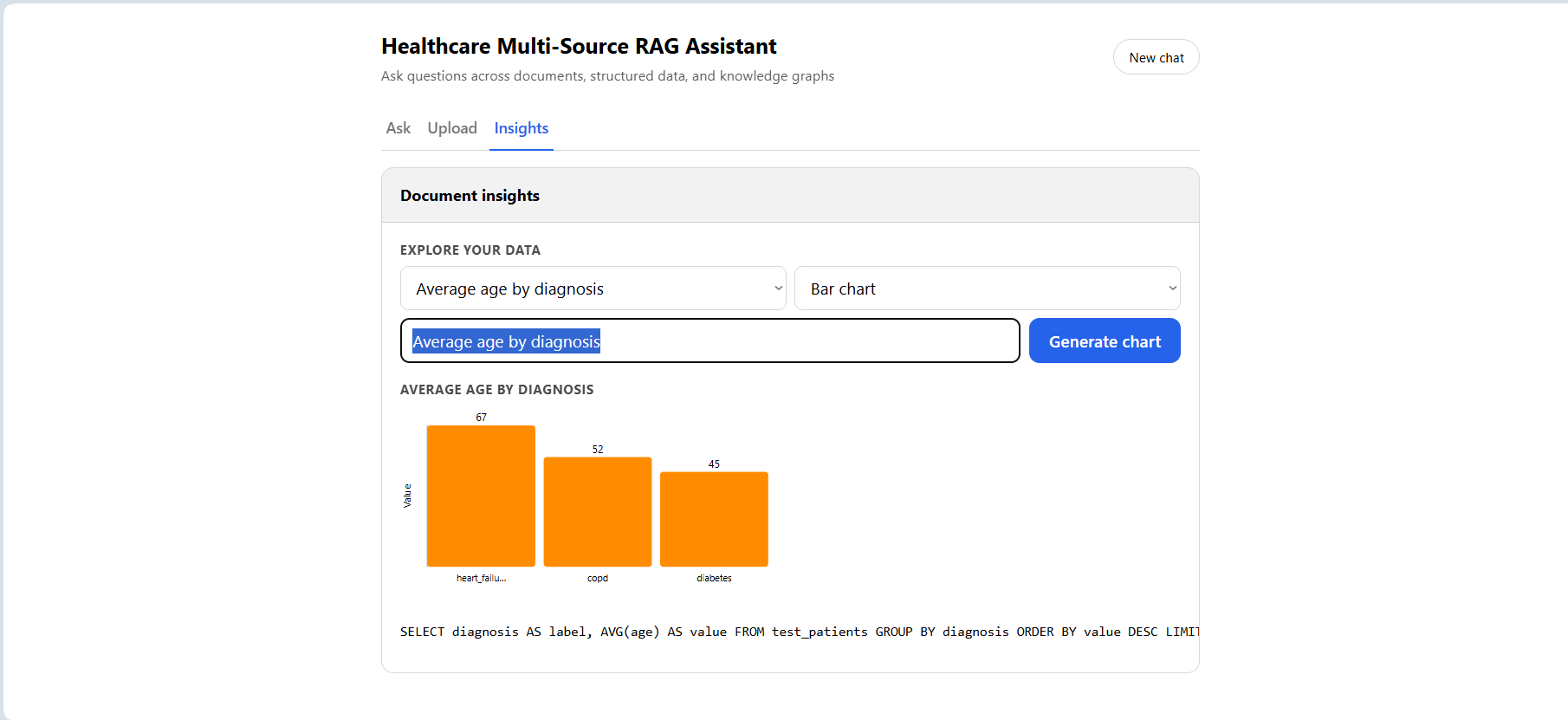
This is a FastAPI backend that lets a user upload healthcare documents (PDF/DOCX/TXT/images) and structured datasets (CSV), then ask questions in plain English. A router agent decides, per question, whether the answer requires document retrieval, structured-data querying, knowledge-graph reasoning, summarization, or classification, and a separate Insights tab lets a user generate charts from uploaded structured data via natural language.
Real, currently-running technology, not aspirational:
| Layer | Technology |
|---|---|
| Backend framework | FastAPI + Uvicorn |
| Orchestration | LangGraph (compiled StateGraph) |
| LLM | Amazon Bedrock — Claude Haiku 4.5 via a cross-region inference profile |
| Embeddings | Amazon Bedrock — Titan Embeddings v2 |
| File storage | Amazon S3 |
| Vector search | Amazon OpenSearch (kNN) |
| Structured-data catalog | AWS Glue Data Catalog + Amazon Athena |
| App database + dual-written structured data | Postgres (self-hosted postgres:16-alpine container — not Amazon RDS) |
| Cache / conversation memory | Redis (self-hosted redis:7-alpine container — not ElastiCache) |
| Knowledge graph | spaCy (extraction) + NetworkX (traversal) + Postgres (storage) — not Amazon Neptune |
| Frontend | One static index.html — hand-rolled vanilla JS/CSS, no framework, no CDN, no build step |
| Deployment | Docker Compose — 3 containers, no ECS/Fargate/Kubernetes |
Environment Setup & Run/Stop
Prerequisites
- Docker + Docker Compose
- An AWS account with access to Bedrock (the configured model), S3, OpenSearch, Glue, and Athena, with credentials available at
~/.awson the host machine (mounted read-only into the backend container) - A
.envfile in the project root (not committed — no.env.exampletemplate exists, so it has to be created fromconfig/settings.py’s field list):
POSTGRES_URL and REDIS_URL are overridden inside docker-compose.yml to point at the postgres/redis service names (Docker’s internal DNS), regardless of what’s in .env, everything else in .env (region, model IDs, bucket, OpenSearch host) applies as-is.
Start
1
docker compose up -d --build
Builds the backend image (installs requirements.txt, the tesseract-ocr and build-essential apt packages, and downloads the spaCy en_core_web_sm model) and starts three containers: backend (port 8000), postgres (port 5432), redis (port 6379).
Verify it’s running
1
2
curl http://localhost:8000/health
# {"status":"healthy"}
The frontend is served at http://localhost:8000/ directly by the FastAPI app, there’s no separate frontend service or port.
View logs
1
2
docker compose logs backend --tail=50
docker compose logs backend -f          # follow
Stop
1
2
docker compose down            # stops and removes containers, keeps the named postgres_data volume
docker compose down -v         # also deletes the Postgres volume — destroys all uploaded/ingested data
Rebuild after a code change
1
2
docker compose up -d --build backend   # rebuild just the backend image
docker compose up -d --build           # rebuild everything (postgres/redis are pulled images, this is effectively the same)
System Flow
There are exactly two top-level flows in this system: ingestion (a file goes in) and question-answering (a question comes out). A third, smaller flow, the chart explorer, sits alongside question-answering but isn’t part of the same routing graph.
Ingestion flow
1
2
3
4
5
6
7
8
9
10
11
12
13
14
15
16
17
18
19
20
POST /upload
    |
    v
detect_file_type()  ->  "structured" | "document" | "image" | "unknown"
    |                                                              |
    v                                                       (unknown -> 400)
"structured" (.csv only)          everything else ("document" or "image")
    |                                       |
    v                                       v
StructuredIngestionWorkflow          DocumentIngestionWorkflow
    - upload to S3                       - upload to S3
    - load_csv()                         - load_document() (pypdf / python-docx /
    - classify_structured_data()           plain read / pytesseract OCR)
    - register_csv_table() (Glue)        - classify_document()
    - load_dataframe() (Postgres          - extract_entities_and_relationships()
      dual-write)                          (spaCy) -> upsert_edge() per relationship
    - status: "registered"                 (Postgres graph_nodes/graph_edges)
                                          - chunk_documents() -> create_embeddings_for_chunks()
                                          - index_chunks() (bulk-indexed into OpenSearch)
                                          - status: "indexed"
Every upload starts at the same fork: detect_file_type() looks only at the file extension and sorts it into "structured", "document", "image", or "unknown" — an "unknown" extension is rejected immediately with a 400, before either workflow runs. From there, exactly one of two workflows takes over end-to-end. A CSV gets read with pandas, classified by column names, then written to two places in parallel effect — a Glue table (for Athena) and a real Postgres table (for direct SQL) — before its status flips to "registered". A document or image gets its text extracted, classified, run through entity/relationship extraction to grow the knowledge graph, then chunked, embedded, and bulk-indexed into OpenSearch before its status flips to "indexed". Both paths write to Postgres at every stage so GET /documents always reflects real, current progress, not just a final success/failure flag.
Question-answering flow
1
2
3
4
5
6
7
8
9
10
11
12
13
14
15
16
17
18
19
20
21
22
23
24
25
POST /ask {question, session_id}
    |
    v
QuestionWorkflow.ask() gathers context:
    SchemaService.describe_tables()   -> Postgres schema + one example row/table
    AthenaService.list_tables()       -> Glue-registered tables
    DocumentStore.list_indexed_document_records()
    MemoryService.get_recent_messages(session_id)
    |
    v
question_graph.invoke(initial_state)   (compiled LangGraph StateGraph)
    |
    v
route_question -> RouterAgent.route() -> one of:
    sql | s3 | rag | graph_rag | summarization | classification
    |
    v
matching tool node runs -> all converge on ->
    |
    v
compose_final_answer -> FinalAnswerAgent.compose()
    -> if session_id present: MemoryService.add_message() x2
    |
    v
{answer, route, sql, sources}
Before the LangGraph even runs, QuestionWorkflow.ask() does a round of context-gathering: what tables exist (Postgres schema plus Glue-registered Athena tables), what documents are available, and — if a session_id was sent — the recent conversation history. All of that gets bundled into one initial_state dict and handed to the compiled graph. RouterAgent looks at the question plus that context and picks exactly one of six routes; whichever tool node runs, its output converges on compose_final_answer, which composes the user-facing answer and, only at that point, writes the new question/answer pair back into memory. The response the client actually receives — {answer, route, sql, sources} — is a small, fixed shape regardless of which of the six routes handled the question.
Chart-explorer flow (separate, unrouted)
1
2
3
4
5
6
7
8
9
10
11
GET /visualizations/suggestions          POST /visualizations {question}
    |                                         |
    v                                         v
VisualizationWorkflow.suggest()          VisualizationWorkflow.chart()
    -> SchemaService + ChartAgent            -> ChartAgent.build_chart()
       .suggest_questions()                     -> generates SELECT ... AS label,
                                                     AGG(...) AS value ... GROUP BY
                                                 -> SQLAgent.execute() (read-only check)
    |                                         |
    v                                         v
["Number of patients by diagnosis", ...]  {title, sql, labels, values}
This flow doesn’t touch question_graph.py, RouterAgent, or any of the nine reasoning agents besides ChartAgent itself — it’s a separate pair of endpoints behind the Insights tab, not a seventh route. GET /visualizations/suggestions introspects the current Postgres schema and asks the model to propose a handful of meaningful group-by questions for whatever tables actually exist. POST /visualizations takes either one of those suggestions or a typed question, constrains the model to generate a SELECT ... AS label, AGG(...) AS value ... GROUP BY ... query, runs it through the same read-only safety check every other SQL-generating agent uses, and returns chart-ready {labels, values} pairs for the frontend’s SVG renderer to draw.
How the Code Is Organized
1
2
3
4
5
6
7
8
9
10
11
12
13
14
15
16
17
18
19
20
21
22
23
24
25
app/backend/
|- main.py                  FastAPI app, CORS, "/" (frontend), "/health"
|- api/routes.py            6 endpoints
|- config/settings.py       pydantic-settings, loads .env
|- state/state.py           QuestionState TypedDict (LangGraph state)
|- graphs/question_graph.py LangGraph StateGraph
|- agents/                  9 agents: router, sql, s3, rag, graph_rag,
|                            summarization, classification, final_answer, chart
|- prompts/                 one *_prompt.py per agent/task, pure string builders
|- services/                model_service, llm_service, embedding_service,
|                            aws_storage_service, athena_service, glue_catalog_service,
|                            relational_store_service, schema_service,
|                            document_store_service, graph_store_service,
|                            cache_service, memory_service
|- workflows/                document_ingestion_workflow, structured_ingestion_workflow,
|                            question_workflow, visualization_workflow
|- tools/                   data_loader, rag_utils, document_resolution,
|                            entity_extraction (spaCy)
|- utils/                   logger, naming, sql_cleanup, validators
|- schemas/                 Pydantic request/response models
|- static/index.html        the entire frontend
|- data/raw/                transient local upload staging (deleted after ingestion)

evaluation/                 evaluate_rag.py, metrics.py, eval_questions.json, evaluation_report.md
tests/                      agents/, prompts/, schemas/, tools/, utils/, evaluation/
Four directory conventions worth knowing before reading further code:
services/— each file owns exactly one raw external client (boto3,opensearchpy,redis, or a SQLAlchemy engine) and nothing else calls that client directly. This is the single most consistent rule in the codebase.agents/— each file is one reasoning task, composingLLMService(neverModelService/boto3directly).workflows/— orchestrate multiple services/agents into one end-to-end operation (an upload, a question, a chart request).tools/— pure(ish) functions with no__init__/no class state: file loading, chunking, entity extraction, document resolution.
What Happens Step-by-Step, How Each Service Works (with key code)
ModelService — the only file that touches boto3 for Bedrock
1
2
3
4
5
6
7
8
9
10
11
12
13
14
15
16
17
18
19
20
21
22
23
24
25
26
27
class ModelService:
    def __init__(self):
        self.client = boto3.client("bedrock-runtime", region_name=settings.aws_region)

    def invoke_text_model(self, prompt, system_prompt=None, model_id=None,
                           max_tokens=1024, temperature=0.3) -> str:
        body = {
            "anthropic_version": "bedrock-2023-05-31",
            "max_tokens": max_tokens,
            "temperature": temperature,
            "messages": [{"role": "user", "content": prompt}]
        }
        if system_prompt:
            body["system"] = system_prompt

        response = self.client.invoke_model(
            modelId=model_id or settings.bedrock_llm_model_id,
            body=json.dumps(body), contentType="application/json", accept="application/json"
        )
        return json.loads(response["body"].read())["content"][0]["text"].strip()

    def invoke_embedding_model(self, text, model_id=None) -> List[float]:
        response = self.client.invoke_model(
            modelId=model_id or settings.bedrock_embedding_model_id,
            body=json.dumps({"inputText": text}), contentType="application/json", accept="application/json"
        )
        return json.loads(response["body"].read())["embedding"]
LLMService.generate() and EmbeddingService.create_embedding() are thin passthroughs to these two methods, every one of the 9 agents calls one of those two wrappers, never ModelService directly.
AWSStorage / OpenSearchVectorStore — S3 and OpenSearch, one file, two classes
1
2
3
4
5
6
7
8
9
10
class AWSStorage:
    def __init__(self):
        self.s3 = boto3.client("s3", region_name=settings.aws_region)

    def upload_file_to_s3(self, file_path, file_name) -> Dict[str, str]:
        file_id = str(uuid.uuid4())
        s3_key = f"uploads/{file_id}/{file_name}"
        self.s3.upload_file(file_path, settings.s3_bucket_name, s3_key)
        return {"file_id": file_id, "file_name": file_name, "s3_key": s3_key,
                "s3_uri": f"s3://{settings.s3_bucket_name}/{s3_key}"}
1
2
3
4
5
6
7
8
9
10
11
12
13
14
15
16
17
class OpenSearchVectorStore:
    def index_chunks(self, chunks, file_id, file_name, document_type,
                      s3_uri=None, metadata=None, batch_size=500) -> None:
        self.create_index_if_not_exists(dimension=len(chunks[0]["embedding"]))
        actions = [
            {"_op_type": "index", "_index": settings.opensearch_index,
             "_id": f"{file_id}_{i}", "_source": {...}}
            for i, chunk in enumerate(chunks)
        ]
        helpers.bulk(self.client, actions, chunk_size=batch_size)

    def search_chunks(self, embedding, k=5, document_type=None) -> List[Dict[str, Any]]:
        query = {"knn": {"embedding": {"vector": embedding, "k": k}}}
        if document_type:
            query = {"bool": {"must": [query], "filter": [{"term": {"document_type": document_type}}]}}
        response = self.client.search(index=settings.opensearch_index, body={"size": k, "query": query})
        return [{"text": h["_source"]["text"], "score": h["_score"], ...} for h in response["hits"]["hits"]]
Every chunk gets a deterministic _id ({file_id}_{chunk_index}) so re-ingesting the same file overwrites the same OpenSearch documents instead of duplicating them, and the whole batch goes in one helpers.bulk() call instead of one HTTP request per chunk.
GlueCatalog / AthenaService — schema catalog and query execution
1
2
3
4
5
6
7
8
9
10
11
12
13
14
class GlueCatalog:
    def register_csv_table(self, dataset_name, s3_uri, df) -> str:
        self.ensure_database_exists()
        table_name = normalize_table_name(dataset_name)
        columns = [{"Name": normalize_table_name(c), "Type": self._map_dtype_to_glue(dt)}
                   for c, dt in df.dtypes.items()]
        table_input = {"Name": table_name, "TableType": "EXTERNAL_TABLE",
                        "StorageDescriptor": {"Columns": columns, "Location": s3_uri, ...}}
        try:
            self.client.get_table(DatabaseName=settings.glue_database_name, Name=table_name)
            self.client.update_table(DatabaseName=settings.glue_database_name, TableInput=table_input)
        except self.client.exceptions.EntityNotFoundException:
            self.client.create_table(DatabaseName=settings.glue_database_name, TableInput=table_input)
        return table_name
1
2
3
4
5
6
7
8
9
10
11
12
13
14
15
16
class AthenaService:
    def run_query(self, sql, poll_interval=1.0, timeout=60.0) -> List[Dict[str, Any]]:
        query_execution_id = self.client.start_query_execution(
            QueryString=sql, QueryExecutionContext={"Database": settings.glue_database_name},
            ResultConfiguration={"OutputLocation": settings.athena_output_s3_uri}
        )["QueryExecutionId"]

        while elapsed < timeout:
            state = self.client.get_query_execution(QueryExecutionId=query_execution_id)["QueryExecution"]["Status"]["State"]
            if state == "SUCCEEDED": break
            if state in ["FAILED", "CANCELLED"]: raise RuntimeError(...)
            time.sleep(poll_interval); elapsed += poll_interval
        else:
            raise TimeoutError("Athena query timed out.")

        return self._parse_results(self.client.get_query_results(QueryExecutionId=query_execution_id))
Athena’s start_query_execution is asynchronous by nature — this is the one place in the codebase with an explicit poll loop, because there’s no synchronous “run and wait” API for Athena.
RelationalDataStore — the Postgres dual-write
1
2
3
4
5
6
7
8
class RelationalDataStore:
    def __init__(self):
        self.engine = create_engine(settings.postgres_url)

    def load_dataframe(self, dataset_name, df) -> str:
        table_name = normalize_table_name(dataset_name)
        df.to_sql(table_name, self.engine, if_exists="replace", index=False)
        return table_name
Three lines, but this is what makes uploaded CSVs queryable by SQLAgent (Postgres) in addition to S3Agent (Athena) — before this existed, only the Athena path worked.
SchemaService — the shared Postgres-schema introspection
1
2
3
4
5
6
7
8
9
10
11
12
13
14
class SchemaService:
    def describe_tables(self) -> Dict[str, List[str]]:
        inspector = inspect(self.engine)
        return {t: [c["name"] for c in inspector.get_columns(t)]
                for t in inspector.get_table_names() if t not in INTERNAL_TABLES}

    def format_description(self, schema) -> str:
        lines = []
        for table_name, columns in schema.items():
            lines.append(f"- {table_name}({', '.join(columns)})")
            sample = self.sample_row(table_name)
            if sample:
                lines.append(f"  example row (note actual value types/formats): {sample}")
        return "\n".join(lines)
The “example row” line exists because of a real bug: without a sample row, the SQL-generating model once produced WHERE readmitted = true against a column that actually stored the text 'yes'/'no', and Postgres rejected the query. Showing one real row fixes it — the model can see the actual value format instead of guessing. INTERNAL_TABLES (documents, conversation_messages, graph_nodes, graph_edges) is excluded so the sql route never sees the app’s own metadata tables as if they were queryable user data.
DocumentStore — file lifecycle tracking
1
2
3
4
5
6
7
8
9
10
class DocumentRecord(Base):
    __tablename__ = "documents"
    file_id = Column(String, primary_key=True)
    file_name = Column(String, nullable=False)
    s3_uri = Column(Text, nullable=False)
    document_type = Column(String, nullable=True)
    status = Column(String, nullable=False, default="uploaded")
    uploaded_at = Column(DateTime, nullable=False)
    processed_at = Column(DateTime, nullable=True)
    error_message = Column(Text, nullable=True)
Status lifecycle: uploaded → processing → registered (structured) or indexed (document), or failed at any point. processed_at is only set when status becomes registered/indexed — a failed document’s processed_at stays null.
CacheService / MemoryService — generic Redis wrapper + conversation memory
1
2
3
4
5
6
7
8
class CacheService:
    def set_json(self, key, value, ttl=None) -> None:
        self.client.set(key, json.dumps(value), ex=ttl)

    def push_json(self, key, value, max_length=None) -> None:
        self.client.rpush(key, json.dumps(value))
        if max_length:
            self.client.ltrim(key, -max_length, -1)
1
2
3
4
5
6
7
8
9
10
class MemoryService:
    def add_message(self, session_id, role, content) -> None:
        # ... Postgres insert (durable) ...
        self.cache_service.push_json(self._cache_key(session_id), message, max_length=self.recent_messages_limit)

    def get_recent_messages(self, session_id) -> List[Dict[str, Any]]:
        cached = self.cache_service.get_list_json(self._cache_key(session_id))
        if cached:
            return cached
        return self.get_history(session_id, limit=self.recent_messages_limit)  # Postgres fallback
Known gap: get_history() (the Postgres fallback) doesn’t write its result back into the Redis cache — a cache miss stays a miss until the next add_message() call happens to push something in.
GraphStoreService — the knowledge-graph store
1
2
3
4
5
6
7
8
9
def upsert_edge(self, source_name, target_name, relationship, file_id, evidence) -> None:
    self.upsert_node(source_name, file_id)
    self.upsert_node(target_name, file_id)
    # INSERT ... ON CONFLICT (source, target, relationship) DO NOTHING/UPDATE

def find_related(self, entity_names, hops=2) -> List[Dict[str, Any]]:
    graph = self._load_full_graph()  # rebuilds a networkx.MultiDiGraph from Postgres, every call
    matches = self._fuzzy_match(entity_names, graph.nodes)
    return [edge for match in matches for edge in nx.ego_graph(graph, match, radius=hops, undirected=True).edges(data=True)]
Nodes are deduped by normalized lowercase text; find_related() reloads and rebuilds the entire graph on every query — fine at prototype scale, a real cost once graph_nodes/graph_edges grow large.
API Request Libraries: Python and JavaScript
The API has no official client library — here’s how to call each endpoint from both.
Python (requests)
1
2
3
4
5
6
7
8
9
10
11
12
13
14
15
16
17
18
19
20
21
22
23
24
25
26
27
28
29
import requests

BASE_URL = "http://localhost:8000"

# Upload a file (structured or document)
with open("patients.csv", "rb") as f:
    response = requests.post(f"{BASE_URL}/upload", files={"file": f})
response.raise_for_status()
upload_result = response.json()
print(upload_result["status"], upload_result.get("postgres_table"))

# Ask a question
response = requests.post(f"{BASE_URL}/ask", json={
    "question": "What is the average age of patients in test_patients?",
    "session_id": "demo-session-1"
})
answer = response.json()
print(answer["route"], answer["answer"])

# List documents
documents = requests.get(f"{BASE_URL}/documents").json()

# Delete a document
requests.delete(f"{BASE_URL}/documents/{upload_result['file_id']}")

# Chart suggestions + generate a chart
suggestions = requests.get(f"{BASE_URL}/visualizations/suggestions").json()["questions"]
chart = requests.post(f"{BASE_URL}/visualizations", json={"question": suggestions[0]}).json()
print(chart["sql"], chart["labels"], chart["values"])
JavaScript (fetch, as used by static/index.html)
1
2
3
4
5
6
7
8
9
10
11
12
13
14
15
16
17
18
19
20
21
22
23
24
25
26
27
28
29
const BASE_URL = '';  // same origin — the frontend is served by the same FastAPI app

// Upload a file
const formData = new FormData();
formData.append('file', fileInput.files[0]);
const uploadResponse = await fetch(`${BASE_URL}/upload`, { method: 'POST', body: formData });
const uploadResult = await uploadResponse.json();

// Ask a question
const askResponse = await fetch(`${BASE_URL}/ask`, {
  method: 'POST',
  headers: { 'Content-Type': 'application/json' },
  body: JSON.stringify({ question, session_id: sessionId })
});
const answer = await askResponse.json();

// List documents
const documents = await (await fetch(`${BASE_URL}/documents`)).json();

// Delete a document
await fetch(`${BASE_URL}/documents/${encodeURIComponent(fileId)}`, { method: 'DELETE' });

// Chart suggestions + generate a chart
const { questions } = await (await fetch(`${BASE_URL}/visualizations/suggestions`)).json();
const chart = await (await fetch(`${BASE_URL}/visualizations`, {
  method: 'POST',
  headers: { 'Content-Type': 'application/json' },
  body: JSON.stringify({ question: questions[0] })
})).json();
Note the JS version never sets a Content-Type header on the upload request — FormData with fetch sets the correct multipart/form-data boundary automatically; setting it manually breaks the boundary.
Quick Tips: Techniques Used with Applied Examples
1. Deterministic IDs make bulk operations idempotent.
1
chunk_id = f"{file_id}_{chunk_index}"
Re-running ingestion for the same file overwrites the same OpenSearch documents instead of duplicating them — no cleanup step needed for the common “re-upload the same file” case.
2. Fail closed, not open, on generated SQL.
1
2
3
4
5
def is_read_only_sql(sql: str) -> bool:
    lowered = sql.strip().lower()
    if not lowered.startswith("select"):
        return False
    return not any(re.search(rf"\b{keyword}\b", lowered) for keyword in BLOCKED_SQL_KEYWORDS)
Whole-word regex boundaries (\b) matter here — a naive substring check would reject SELECT dropout_rate FROM patients because it contains “drop.” This one doesn’t.
3. Let the model see real data, not just column names.
Covered above under SchemaService — showing one example row fixed a genuine boolean-vs-text SQL generation bug that column names alone couldn’t prevent.
4. Strip markdown fences defensively, not just backticks.
1
2
3
4
def clean_sql_response(response: str) -> str:
    text = re.sub(r"^```[a-zA-Z]*\n?", "", response.strip())
    text = re.sub(r"\n?```$", "", text)
    return re.sub(r"^sql\s*\n", "", text, flags=re.IGNORECASE).strip()
A plain .strip("”) leaves a stray sql\n prefix behind when the model wraps a response in a ```sql ` fence — that prefix alone was enough to make a perfectly valid query fail the is_read_only_sql() check, because it no longer started with SELECT.
5. Degrade gracefully on optional LLM steps, never crash on them. Reranking (see Part 2) is a clear example: if the reranker’s response can’t be parsed, log a warning and fall back to the original order — never raise out of an optional quality-improvement step.
6. Extract shared fuzzy-matching logic once it’s needed twice.
resolve_document() moved out of SummarizationAgent into tools/document_resolution.py the moment ClassificationAgent needed the same “which uploaded file is this question about” logic — a plain function, no class, no AWS dependency, easy to test in isolation.
—
Continue to Part 2 for the LangGraph agentic core: routing patterns, RAG/GraphRAG internals, and a resource index of every doc in this repository.
GitHub Repository
GitHub Code: Healthcare Multi-Source Agentic RAG Platform