Developing Multi Agentic Systems with Crew: Part 1
Project && Guide
Table of Contents
- Introduction to CrewAI
- Understanding Multi-Agent AI Systems
- Why Multi-Agent Systems Matter
- CrewAI System Architecture and Core Concepts
- Tools, Integrations, and Multi-Model Systems
- Agent Collaboration and Workflow Orchestration
- Production, Reliability, and Evaluation
- Practical Implementation and Advanced CrewAI Design
- Resources
Introduction to CrewAI
This section introduces CrewAI and explains the fundamental motivation behind multi‑agent AI systems. Instead of relying on a single language model to handle every responsibility, CrewAI enables multiple intelligent agents to collaborate inside coordinated workflows. Understanding these core ideas is important before exploring more advanced concepts such as orchestration, flows, memory, and production deployments.
CrewAI is an open‑source framework for building and orchestrating autonomous AI agents that collaborate to solve complex problems. Instead of relying on a single AI model to perform every task, CrewAI enables multiple specialized agents to work together inside coordinated workflows. CrewAI provides two major concepts:
- Crews → Teams of AI agents collaborating on tasks
- Flows → Event‑driven orchestration systems that coordinate workflows and data movement
Framework capabilities:
- Multi-agent collaboration
- Delegation and specialization
- Tool integration
- Memory and context sharing
- Production-ready automation
- Event-driven workflows
- Human feedback and evaluation
Common application areas:
- Research automation
- AI assistants
- Data analysis pipelines
- Content generation systems
- RAG applications
- Enterprise workflows
- AI orchestration systems
- Multi-step reasoning tasks
Understanding Multi‑Agent AI Systems
This section explains what multi‑agent systems are and how they differ from traditional AI applications. The goal is to understand how multiple specialized agents can collaborate, share information, and solve problems more efficiently than a single AI model acting alone. A multi‑agent AI system consists of multiple intelligent agents working together to achieve a shared objective.
Each agent typically has:
| Aspect | Details |
|---|---|
| Agent capabilities | A specialized responsibility, access to tools, independent reasoning capability, and the ability to collaborate with other agents |
| Dynamic decision-making | Which tools to use, which tasks to delegate, how to react to changing data, and how to adapt when failures occur |
This makes multi‑agent systems significantly more flexible than traditional software systems.
Example: A business intelligence system may include:
- Research Agent → collects information
- Analysis Agent → processes findings
- Writer Agent → generates reports
- Reviewer Agent → validates output quality
Together, these agents create a scalable and intelligent workflow.
Why Multi‑Agent Systems Matter
This section discusses why multi‑agent architectures are becoming increasingly important in modern AI systems. As workflows become more complex and enterprise applications require greater flexibility, scalability, and reasoning capability, multi‑agent systems provide a more adaptive and modular solution compared to traditional software approaches. Traditional software applications are deterministic. They require developers to manually define:
| Approach | Key Characteristics |
|---|---|
| Traditional software | Rules, edge cases, conditions, decision logic are manually defined by developers |
| AI and multi-agent systems | Adaptive reasoning with specialization, delegation, parallel execution, context sharing, dynamic workflows, and adaptive problem solving |
Benefits of Multi‑Agent Systems
Scalability: Different agents can independently handle specialized tasks.
Flexibility: Agents can dynamically change strategies based on context.
Parallel Processing: Multiple tasks can execute simultaneously.
Reliability: Systems can retry failed operations or switch tools automatically.
Maintainability: Individual agents can be updated independently.
Improved Quality: Specialized agents often produce higher quality results.
CrewAI System Architecture and Core Concepts
1- Single‑Agent vs Multi‑Agent Architectures
This section compares single‑agent and multi‑agent AI architectures to highlight how system design evolves as task complexity increases. Understanding the strengths and limitations of both approaches helps developers choose the right architecture for different use cases.
1-1-Single‑Agent Systems
In a single‑agent architecture:
| Aspect | Details |
|---|---|
| Flow | A user provides a task; one LLM processes the request; the LLM may call tools; the LLM generates the final response |
| Advantages | Simple architecture, lower operational complexity, faster setup, lower coordination overhead |
| Limitations | Difficult to scale for complex workflows, limited specialization, harder to manage large tasks, reduced parallelism |
1-2-Multi‑Agent Systems
In a multi‑agent architecture:
| Aspect | Details |
|---|---|
| Flow | Tasks are distributed among multiple agents; agents collaborate and delegate work; each agent may use different tools; intermediate results are shared; final outputs are synthesized |
| Advantages | Specialized reasoning, better scalability, improved collaboration, parallel execution, more advanced workflows, better modularity |
Example Workflow
- Research agent gathers information
- Analysis agent evaluates findings
- Writer agent prepares a report
- Reviewer agent validates output
This creates a more intelligent and production‑ready system.
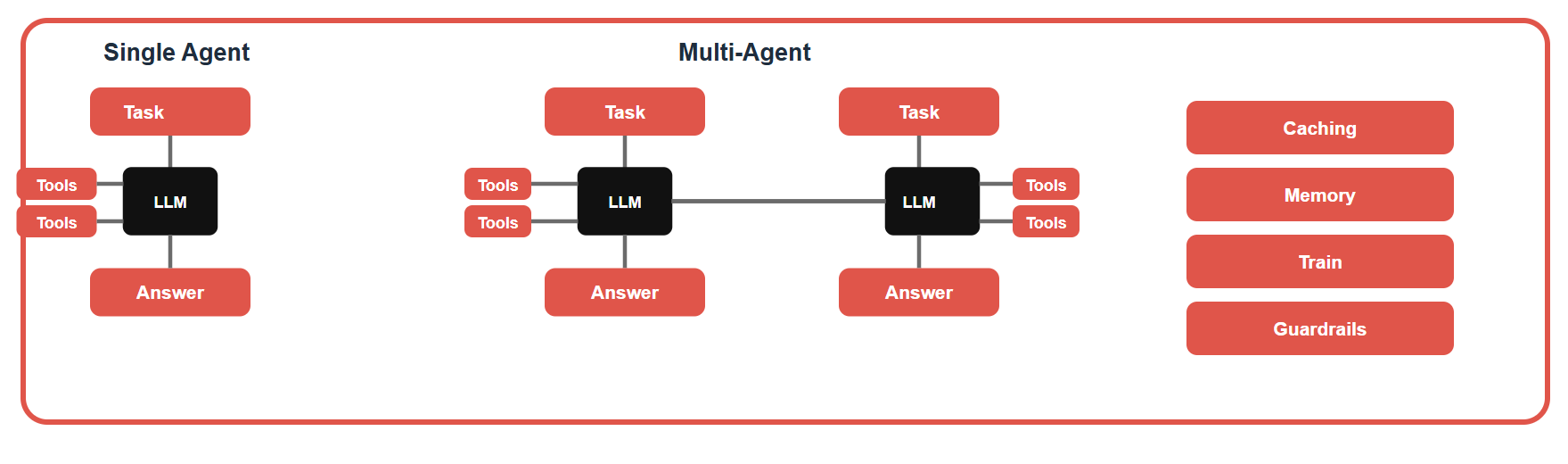
This diagram compares single-agent and multi-agent AI architectures to highlight how complexity and capability scale. On the left, a single-agent system shows a straightforward flow: a task is given to one LLM, which may use tools, and then produces an answer. This setup is simple and efficient for well-defined problems but can be limited when tasks become more complex. In contrast, the multi-agent system in the center distributes multiple tasks across different LLM-based agents, each potentially using its own tools and producing intermediate answers. These agents can collaborate or operate in sequence, enabling more advanced reasoning, parallel processing, and specialization. On the right, supporting components such as caching, memory, training, and guardrails enhance the overall system by improving performance, retaining context, enabling learning, and ensuring safe and controlled behavior. Together, the image illustrates how moving from a single-agent to a multi-agent design allows for more scalable, flexible, and intelligent AI solutions.
2- Core Components of CrewAI
This section introduces the primary building blocks that make up a CrewAI application. These components work together to create scalable and collaborative AI systems that can reason, communicate, access tools, and coordinate complex workflows. CrewAI systems are built using several major building blocks.
| Component | Description |
|---|---|
| Agents | Autonomous AI units responsible for reasoning and decision-making |
| Tasks | Structured work units assigned to agents |
| Tools | External systems agents can access (for example: APIs, databases, web search, SQL engines, email systems, embedding search, cloud services) |
| Crews | Collections of agents collaborating together |
| Flows | Event-driven orchestration pipelines connecting crews and logic |
| Memory | Persistent storage of context and information |
| Guardrails | Validation and safety systems |
| Evaluation Systems | Testing and quality measurement infrastructure |
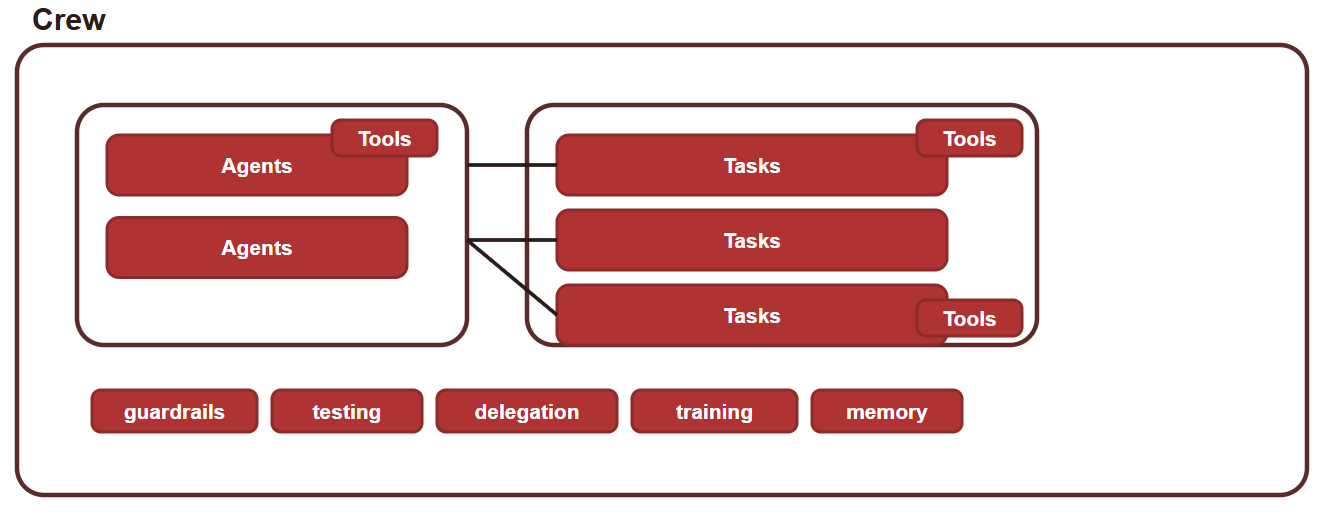
This diagram shows the core structure of a Crew-based AI system, where agents, tasks, and tools interact as a coordinated workflow inside a single environment. On the left, multiple agents represent intelligent units responsible for reasoning and decision-making. These agents are connected to a set of tasks on the right, which define the actual steps or operations to be executed. Each task can utilize specific tools, enabling agents to interact with external systems, APIs, databases, or internal logic to complete their work. The connections between agents and tasks highlight how responsibilities are distributed and how agents can collaborate or delegate work across multiple tasks. At the bottom, supporting components such as guardrails, testing, delegation, training, and memory provide governance, reliability, learning capability, and context retention, ensuring that the entire system operates safely, efficiently, and adaptively over time.
3- Agent Anatomy and Design
This section explains how AI agents are structured inside CrewAI. Well‑designed agents are essential for creating reliable multi‑agent systems because each agent must clearly understand its role, objectives, behavior, and available tools.
Each CrewAI agent typically includes several important components.
| Component | Description | Examples / Influence |
|---|---|---|
| Role | Defines the agent’s responsibility | Researcher, Analyst, Writer, Reviewer, Planner |
| Goal | Specifies the desired outcome | “Find relevant information about a company.” |
| Backstory | Provides behavioral context and personality | Influences tone, reasoning style, expertise level, and priorities |
| Tools | Defines which external systems the agent can access | Search tools, SQL tools, APIs, RAG systems, web scraping tools |
Example Agent:
1
2
3
4
5
6
researcher = Agent(
    role="Senior Researcher",
    goal="Find relevant information about companies",
    backstory="Experienced market analyst with strong research skills",
    tools=[search_tool]
)
4- Tasks and Context Management
This section focuses on how work is organized and coordinated between agents. Tasks define what agents should accomplish, while context management ensures that information flows correctly across multiple stages of a workflow. Tasks define the actual work agents perform.
A task generally includes:
- Description
- Expected output
- Assigned agent
- Dependencies
- Context
Example Task
1
2
3
4
5
research_task = Task(
    description="Research the company and summarize findings",
    expected_output="Structured company summary",
    agent=researcher
)
4-1- Context‑Based Dependencies
CrewAI supports task dependencies using context. This allows to parallel execution, dependency management, and data sharing between tasks
Example
An analysis task may depend on two research tasks.
The analysis task will:
- Wait for both research tasks to finish
- Use their outputs as input
This enables complex structured workflows.
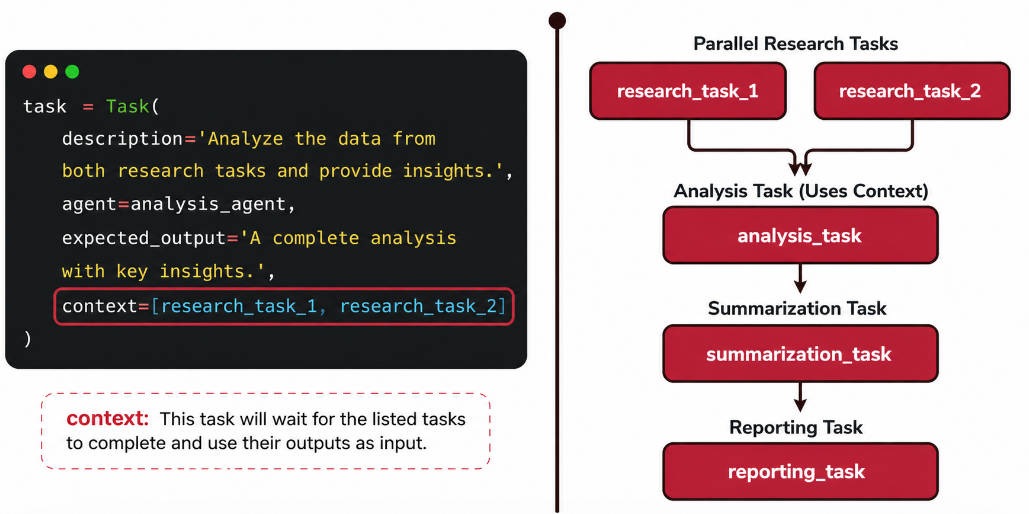
This image demonstrates how task dependencies are managed using context in a multi-step AI workflow. On the left side, a code snippet defines an analysis task that explicitly depends on the outputs of two prior research tasks through the context parameter. This means the analysis task will not start until both research tasks are completed, and it will use their results as input. On the right side, this logic is visualized as a workflow: multiple research tasks run in parallel, their outputs are combined in the analysis task, and the process continues sequentially through summarization and reporting. Overall, the diagram highlights how context enables coordination between parallel and sequential steps, ensuring that data flows correctly across tasks in a structured pipeline.
Tools, Integrations, and Multi-Model Systems
1- Tools and Integrations
This section explores how AI agents interact with external systems and real‑world data sources. Tool usage is one of the most powerful capabilities of modern AI agents because it enables them to move beyond text generation and actively perform operations in external environments. One of the most important capabilities of AI agents is tool usage. Agents can integrate with:
- External APIs
- Databases
- Internal applications
- Cloud services
- Search engines
- Email systems
- Calendars
- RAG systems
- SQL systems
1-1- Three Integration Stages
Before Execution
Fetch data before the workflow starts.
Examples:
| Stage | Description | Examples | Notes |
|---|---|---|---|
| Before Execution | Fetch data before the workflow starts | Load documents; retrieve company data; pull records from APIs | Prepares inputs and context before agent reasoning begins |
| During Execution | Agents directly interact with tools while reasoning | Search the web; query SQL databases; perform RAG retrieval; trigger workflows | This is the most important integration stage |
| After Execution | Send or store results | Save reports; trigger external systems; send notifications; update databases | Persists outputs and triggers downstream actions |
1-2- Real‑Time Adaptability
A major advantage of CrewAI systems is adaptability.
| Context | Details |
|---|---|
| Trigger conditions | An API changes, a tool fails, or a database is unavailable |
| Agent responses | Detect failures, retry operations, switch tools, and use alternative approaches |
| Outcome | Creates self-healing AI systems |
2- Multi‑Model Architectures
This section explains how different language models can be combined within the same multi‑agent system. Using multiple models allows organizations to optimize speed, cost, reasoning quality, and scalability depending on the needs of each task. CrewAI supports multi‑model workflows.
Different agents can use different LLMs depending on:
- Task complexity
- Speed requirements
- Cost considerations
- Quality requirements
Example:
| Agent | Model choice | Benefits |
|---|---|---|
| Research Agent | Uses a smaller and faster model | Lower cost, faster execution, suitable for lightweight tasks |
| Writer Agent | Uses a larger fine-tuned model | Better language quality, stronger reasoning, brand voice consistency |
Agent Collaboration and Workflow Orchestration
1- Crews and Flows
This section explains two of the most important concepts in CrewAI: Crews and Flows. Crews organize collaborative agent teams, while Flows provide event‑driven orchestration and advanced workflow control for production‑grade AI systems.
2-1- Crews:
A Crew is a collaborative unit consisting of:
| Crew Element | Description |
|---|---|
| Agents | Intelligent units that reason and execute assigned responsibilities |
| Tasks | Structured units of work coordinated across agents |
| Tools | External systems and utilities agents use during execution |
| Execution logic | The orchestration rules that control how work runs |
2-2- Flows:
Flows provide event‑driven orchestration.
Flows enable:
| Flow Capability | Description |
|---|---|
| Multi-crew coordination | Coordinates multiple crews across shared workflows |
| Custom Python logic | Allows custom programmatic logic inside flow orchestration |
| State management | Maintains and updates workflow state across steps |
| Data movement | Transfers data between tasks, agents, and systems |
| Event handling | Reacts to workflow and system events |
| External integrations | Connects with APIs, tools, and enterprise platforms |
What Flows Can Do:
Flows combine traditional programming and agent‑based reasoning. This creates highly flexible AI systems. Flows allow developers to:
| Flow Capability | Description |
|---|---|
| Fetch data before execution | Load or retrieve data before workflow starts |
| Apply business logic | Implement custom rules and logic |
| Transform outputs | Modify or reformat results as needed |
| Trigger APIs | Call external APIs during workflow |
| Connect multiple crews | Coordinate several crews in one flow |
| Add conditional execution | Branch or skip steps based on conditions |
| Integrate with enterprise systems | Connect with business platforms and tools |
2- Parallelism, Dependencies, and Async Workflows
This section explains how complex AI systems coordinate multiple tasks efficiently using parallel execution, dependencies, and asynchronous workflows. These concepts are essential for designing scalable and responsive enterprise AI applications.
Complex AI workflows often require:
| Workflow Requirement | Description |
|---|---|
| Parallel execution | Enables independent tasks to run simultaneously for better throughput |
| Task dependencies | Ensures tasks execute in the correct order when outputs are required downstream |
| Context sharing | Allows agents and tasks to exchange relevant information across stages |
| Sequential coordination | Orchestrates step-by-step progression when stages must run in sequence |
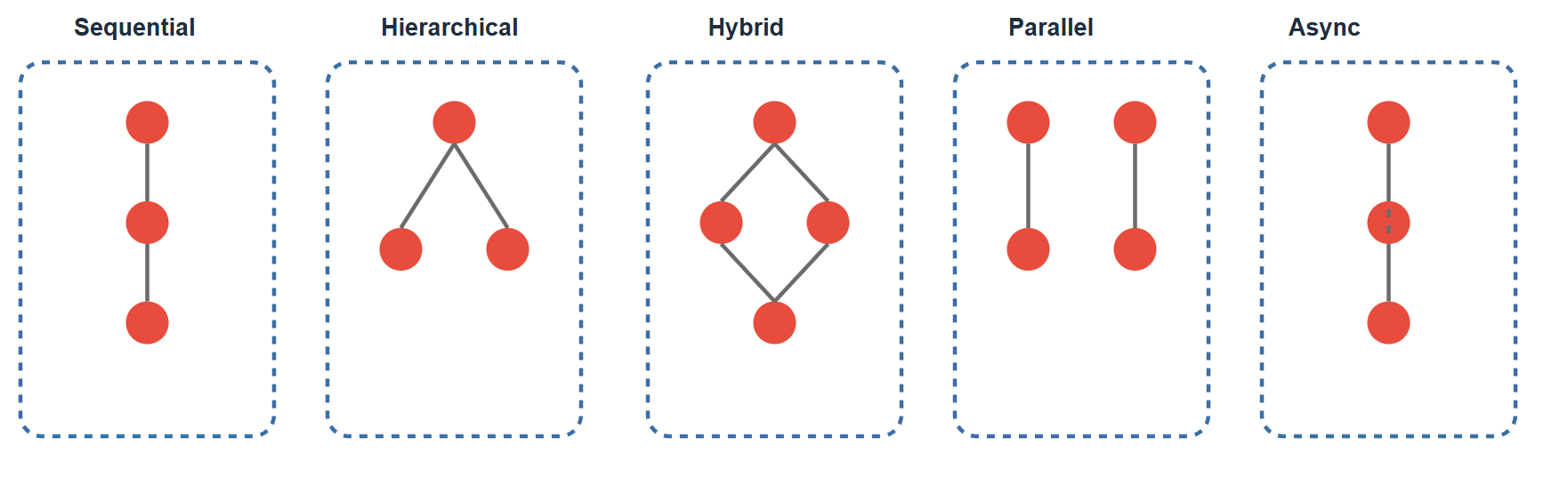
This diagram illustrates different execution patterns for multi-agent systems, showing how tasks and agents can be organized depending on the problem. In the Sequential pattern, tasks are executed one after another in a linear flow, where each step depends on the previous one. The Hierarchical pattern introduces a top-down structure, where a main agent delegates subtasks to lower-level agents, similar to a manager-worker relationship. The Hybrid approach combines multiple patterns, allowing both branching and merging of tasks for more flexible workflows. In the Parallel pattern, multiple tasks or agents run simultaneously, improving speed and efficiency when tasks are independent. Finally, the Async (Asynchronous) pattern allows tasks to run independently without waiting for others to complete, enabling non-blocking execution and better responsiveness. Together, these patterns demonstrate how agent systems can be designed to balance control, scalability, and performance based on different use cases.
Example Workflow:
Step 1: Research Multiple agents gather information in parallel.
Step 2: Analysis Analysis tasks combine research outputs.
Step 3: Summarization Results are condensed into key insights.
Step 4: Reporting Final reports are generated.
Dependency Management:
CrewAI uses context to manage dependencies. This ensures:
- Tasks start only when required inputs exist
- Data flows correctly between stages
- Workflows remain structured and reliable
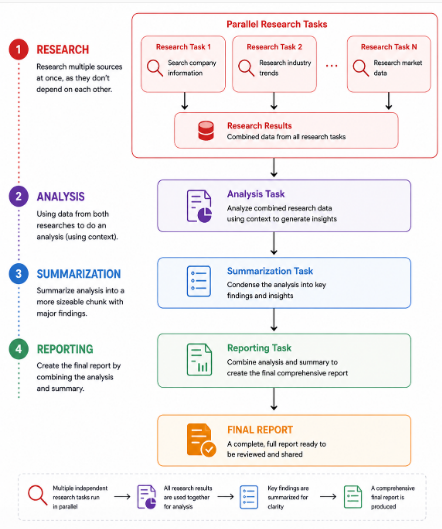
This diagram illustrates a structured multi-step workflow for an AI-driven analysis process. It begins with research, where multiple independent tasks run in parallel to gather information from different sources. The outputs of these research tasks are then combined in the analysis stage, where context from all sources is used to generate deeper insights. Next, the results move to the summarization phase, where the analysis is condensed into key findings for easier understanding. Finally, in the reporting stage, both the detailed analysis and the summary are integrated to produce a comprehensive final report. This flow demonstrates how parallel tasks, dependency management, and sequential processing can be combined to build an efficient and scalable AI workflow.
Production, Reliability, and Evaluation
1- Memory, Guardrails, and Reliability
This section discusses the reliability mechanisms required for production AI systems. While LLM reasoning is powerful, enterprise applications also require persistent memory, safety constraints, monitoring, and validation systems to ensure stable and trustworthy behavior.
Production AI systems require more than just LLM reasoning.
CrewAI supports advanced reliability features.
1-1- Memory:
| Category | Purpose / Effect | Types or Examples |
|---|---|---|
| Memory | Enables agents to retain context, share knowledge, reduce repeated work, and maintain continuity across runs | Short-term memory, long-term memory, shared memory, vector memory |
1-2- Guardrails:
Guardrails reduce hallucinations and enforce constraints.
| Category | Purpose / Effect | Types or Examples |
|---|---|---|
| Guardrails | Reduce hallucinations and enforce constraints | Schema validation, output formatting rules, tool restrictions, human approval checkpoints, security policies |
1-3- Reliability Features:
| Category | Purpose / Effect | Types or Examples |
|---|---|---|
| Reliability Features | Improve robustness and operational stability in production systems | Retries, fallback strategies, failure detection, monitoring, logging, error handling |
These features are essential for enterprise AI systems.
2- Testing, Evaluation, and Training
This section focuses on measuring and improving the quality of AI systems. Multi‑agent applications must be continuously evaluated to ensure they remain accurate, reliable, cost‑effective, and aligned with user expectations. AI systems require rigorous evaluation.
Key evaluation metrics may include:
| Evaluation Metric | What It Measures |
|---|---|
| Accuracy | Correctness of generated outputs |
| Task success rate | Percentage of tasks completed successfully |
| Latency | Time required to produce results |
| Cost | Resource and operational expense per run or workload |
| Consistency | Stability and repeatability of outputs across runs |
| Hallucination rate | Frequency of incorrect or fabricated information |
| User satisfaction | Perceived usefulness and quality from end users |
2-1- Human Feedback:
CrewAI systems can improve over time using:
| Method | Description |
|---|---|
| Human feedback | Collecting input from users to improve the system |
| Reinforcement learning | Using reward-based learning to optimize behavior |
| Evaluation pipelines | Automated processes to assess system performance |
| Fine-tuning | Adjusting models based on new data and feedback |
This enables continuous optimization.
2-2- Testing Strategies:
| Testing Strategy | Purpose |
|---|---|
| Functional Testing | Validate task execution |
| Integration Testing | Verify tool interactions |
| Evaluation Testing | Measure AI quality |
| Stress Testing | Assess scalability and performance |
3- Production‑Ready AI Systems
This section explains the additional infrastructure and engineering practices needed to deploy CrewAI applications in real production environments. Building enterprise AI systems requires much more than simply connecting agents together. Building production AI systems requires more than connecting agents.
A production system usually includes:
| Production Component | Role |
|---|---|
| Monitoring | Tracks system health, latency, failures, and operational behavior |
| Logging | Records events for observability, troubleshooting, and audits |
| Security | Protects data, access, and system boundaries |
| Evaluation | Measures output quality and system performance |
| Memory | Preserves context and shared knowledge across workflows |
| Retries | Recovers from transient failures automatically |
| Guardrails | Enforces constraints and reduces unsafe or invalid outputs |
| API management | Manages service interfaces, policies, and integration control |
| Scalable infrastructure | Supports reliable growth in workload and system demand |
A Production Architecture Components includes:
| Architecture Component | Purpose |
|---|---|
| APIs | Expose AI services |
| Databases | Store memory and structured data |
| Vector databases | Enable RAG retrieval |
| Monitoring systems | Track latency and failures |
| Cloud infrastructure | Deploy scalable AI services |
| Event systems | Coordinate workflows |
Practical Implementation and Advanced CrewAI Design
1- Real‑World Data Analysis Crew Example
This section presents a practical example of how multiple agents, tasks, and tools can collaborate to build a real‑world AI data analysis pipeline. The example demonstrates how CrewAI concepts are applied in enterprise workflows. A practical AI data analysis system may involve:
| Section | Details |
|---|---|
| External Data Sources | APIs, websites, public datasets |
| Internal Data Sources | Company databases, documents, internal systems |
| Specialized Agents | Research Agent: collects information; Analysis Agent: processes findings; Enrichment Agent: adds missing information; Reporting Agent: generates structured outputs |
| Tool Usage | Web search, SQL queries, RAG retrieval, APIs, embedding search |
| Self-Healing Workflows | If tools fail, agents retry, alternative systems are used, missing information is inferred, and workflows continue automatically |
This creates resilient enterprise AI systems.
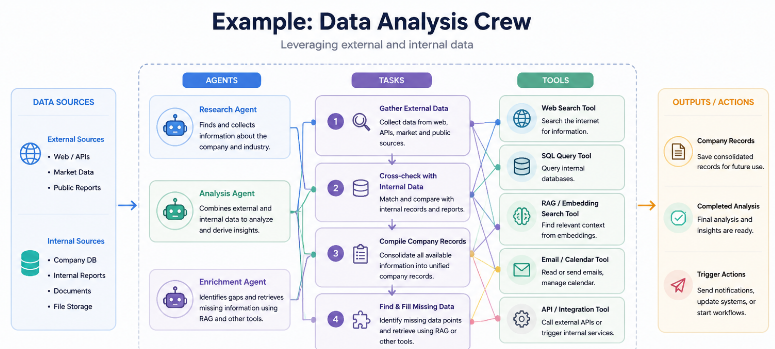
This diagram illustrates a complete AI Data Analysis Crew architecture, where agents, tasks, and tools work together as a unified system to process data intelligently. On the left, data is collected from both external sources (like APIs and web data) and internal systems (such as company databases and documents). Multiple specialized agents, such as a research agent, analysis agent, and enrichment agent, collaborate by executing a sequence of structured tasks, including gathering data, cross-checking with internal records, compiling results, and identifying missing information. To accomplish these tasks, agents rely on various tools like web search, SQL queries, RAG-based embedding search, and API integrations. The system then produces outputs such as completed analyses, structured company records, or triggered actions in other systems. A key feature highlighted is the self-healing capability, where agents can detect failures in tools or data sources and adapt by retrying with alternative methods, ensuring a robust, flexible, and scalable data analysis workflow.
2- YAML Configuration Examples
This section demonstrates how CrewAI configurations can be organized using YAML files. YAML‑based configuration improves readability, maintainability, and collaboration by separating workflow definitions from application logic. CrewAI supports YAML‑based configuration. This allows, easier collaboration, better maintainability, and separation of configuration and code.
1-Agents YAML:
1
2
3
4
researcher:
  role: "Senior Researcher"
  goal: "Find relevant information"
  backstory: "Experienced analyst with strong research skills"
2-Tasks YAML
1
2
3
4
research_task:
  description: "Research the topic and summarize key findings"
  expected_output: "Bullet list of important findings"
  agent: researcher
3-Minimal Crew Checklist
This checklist summarizes the core setup steps needed to build a reliable CrewAI workflow from configuration to validation.
| Step | Checklist Item |
|---|---|
| 1 | Define agents |
| 2 | Define tasks |
| 3 | Add tools |
| 4 | Configure memory |
| 5 | Choose execution process |
| 6 | Add guardrails |
| 7 | Test workflows |
3- Building Complex Crew Systems
This section explores advanced CrewAI architectures involving multiple crews, event‑driven coordination, and conditional execution logic. These approaches enable the creation of large‑scale enterprise AI systems. Advanced CrewAI systems may involve:
| Advanced Capability | Description |
|---|---|
| Multiple crews | Organizes specialized teams for different workflow stages |
| Event-driven workflows | Triggers actions based on events and system state changes |
| Parallel execution | Runs independent tasks concurrently to improve throughput |
| Conditional logic | Applies branching behavior based on rules and runtime context |
| State management | Maintains workflow context and execution status across steps |
| Enterprise integrations | Connects with internal systems, APIs, and business platforms |
In Multi‑Crew Architectures:
One crew may perform researchand another crew may perform analysis. A final crew may generate reports and Flows coordinate these systems. Flows allow combining AI and traditional programming to:
| Flow Function | Purpose |
|---|---|
| Python code execution | Runs custom logic and programmatic workflow steps |
| Agent collaboration | Coordinates communication and task handoffs across agents |
| Data transformation | Converts and restructures data between workflow stages |
| API orchestration | Connects and sequences calls to external services |
| Business logic enforcement | Applies enterprise rules, constraints, and governance policies |
This hybrid approach is powerful for enterprise automation.
4- Best Practices for Designing CrewAI Applications
This section summarizes important design principles and recommendations for building maintainable, scalable, and reliable CrewAI applications. Following these practices helps reduce complexity and improve long‑term system quality.
| Best Practice | Guidance |
|---|---|
| Use Specialized Agents | Avoid giving one agent too many responsibilities |
| Use Parallelism Carefully | Parallel execution improves speed but increases coordination complexity |
| Add Guardrails Early | Prevent invalid outputs and hallucinations |
| Separate Concerns | Keep Agents, Tasks, Tools, and Flows modular and maintainable |
| Evaluate Continuously | Track quality, latency, cost, and reliability |
| Use Multi-Model Strategies | Match model size to task complexity |
| Design for Failure | Add retries, logging, monitoring, and fallbacks |
Resources
- CrewAI Documentation:
- CrewAI Introduction:
- CrewAI Core Concepts
- Practical Multi AI Agents and Advanced Use Cases with CrewAI:
GitHub Repository
GitHub Code: Adaptive CrewAI: Learning Through Train-Test-Feedback
GitHub Code: Bank Assistant CrewAI