Developing Multi Agentic Systems with Crew: Part 2
Project && Guide
Table of Contents
- Overview
- Performance Optimization in CrewAI
- Multi-Model AI Systems in CrewAI
- Build, Run, Deploy, and Integrate
Overview
Trained Agents CrewAI, is a workflow-first multi-agent system built to improve performance, consistency, and deployment readiness across multiple CrewAI executors. Instead of relying on a single chatbot, the system uses specialized crews for support, advisory, sales, and content tasks.
The key idea is to combine three layers of capability:
- performance optimization through testing and feedback,
- model selection through multi-model routing,
- and production delivery through API-based deployment.
The result is a crew system that can be evaluated, trained, and iterated over time while staying modular enough to support multiple business workflows.
Performance Optimization in CrewAI
This section focuses on how to optimize the performance of AI agents and crews in production systems by balancing speed and quality. Smaller models provide faster responses, while larger models deliver higher-quality outputs but with slower performance. The key is to choose the right model for each task while maintaining consistency across executions.
Performance is evaluated using testing, where each task’s output is compared with its expected result. CrewAI provides a testing feature (CrewAI test) that runs tasks, evaluates outputs using a judge LLM, and generates a report to measure quality and consistency.
To improve results, this section introduces the training feature (CrewAI train), which allows users to give feedback after each task. This feedback is processed and stored in the system’s memory, enabling agents to learn from mistakes and produce more accurate and consistent outputs over time.
Core Ideas
- Smaller models are better for speed and cost efficiency.
- Larger models are better for deeper reasoning and higher-quality outputs.
- Testing measures whether task outputs match the expected target.
- Training turns human feedback into reusable learning signals.
Why it matters
In production, the goal is not only to generate a correct response once. The goal is to keep quality stable across many runs, many users, and many changing inputs.
Speed vs Quality Trade-off
Smaller models are faster, more cost-efficient, and require fewer resources, making them suitable for simple or time-sensitive tasks. Larger models offer higher-quality outputs with stronger reasoning and better adherence to complex instructions, but they come at the cost of slower performance.
The practical takeaway is that the best system does not use only one model. It assigns the right model to the right task and keeps performance consistent across the whole workflow.
Judge LLM Evaluation
CrewAI can evaluate a workflow by passing task outputs to a judge LLM. That judge compares results across multiple runs and produces a score table with metrics such as average score and execution time.
1
crew.test(inputs={"topic": "customer support"})
Feedback-Driven Training Loop
A training loop pauses after each task to collect feedback, stores that feedback in memory, and uses it to improve future runs.
1
2
3
4
5
crew.train(
    n_iterations=3,
    inputs={"topic": "customer support"},
    feedback="Improve clarity, reduce repetition, and focus on actionable recommendations."
)
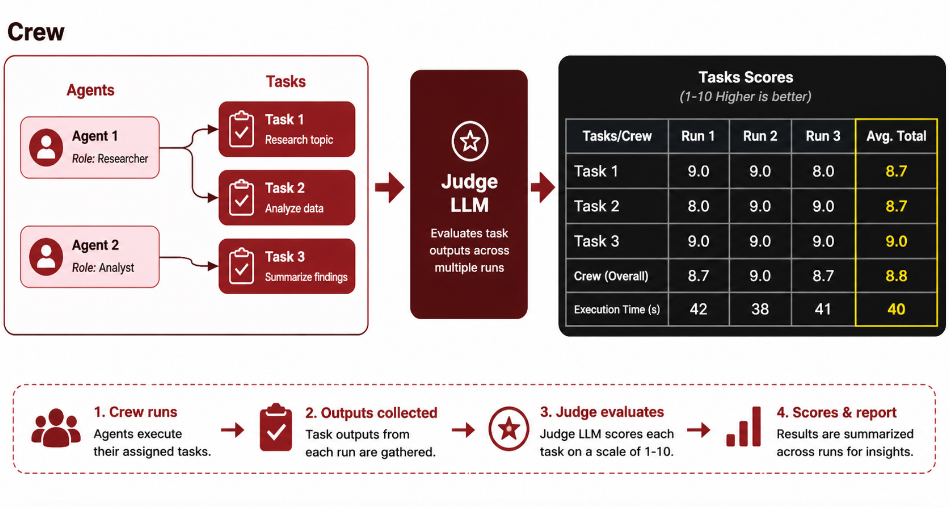
This image illustrates how a CrewAI system is evaluated using a Judge LLM to measure performance and consistency. On the left, a crew composed of multiple agents executes a series of tasks, each handled by specialized roles. The outputs from these tasks are then passed to a Judge LLM, which evaluates the results across multiple runs. On the right, a scoring table summarizes the performance of each task and the overall crew using metrics such as individual run scores, average scores, and execution time. This process allows developers to quantitatively assess the quality and consistency of their AI workflows, identify weak tasks, and iteratively improve the system based on structured feedback.
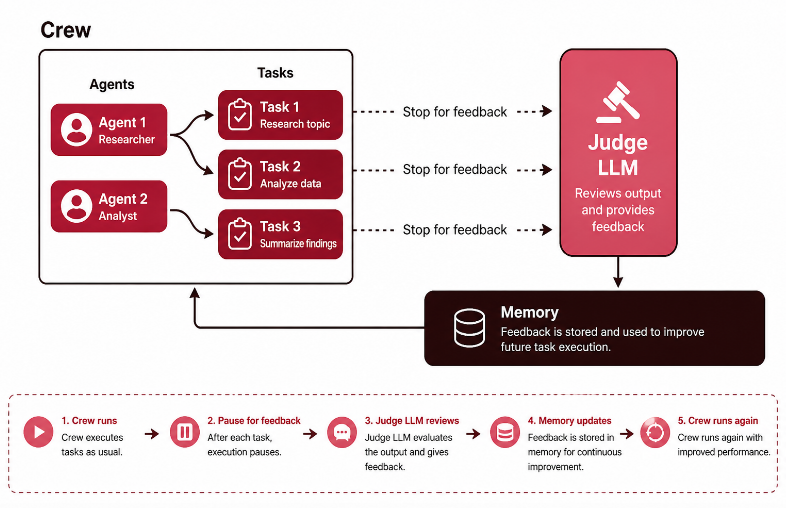
This image illustrates a feedback-driven training loop in a CrewAI system. A crew of agents executes a sequence of tasks, but instead of completing the entire workflow at once, the process pauses after each task to collect feedback. This feedback is evaluated by a Judge LLM, which reviews the task outputs and provides guidance on what can be improved. The feedback is then stored in memory, allowing the system to learn from past mistakes. When the crew runs again, it uses this stored knowledge to produce better and more consistent results. This iterative loop enables continuous improvement, making the system more accurate and aligned with desired outcomes over time.
Multi-Model AI Systems in CrewAI
This section explains how to build multi-model AI systems, where different agents use different models to optimize performance. Instead of relying on a single model, you can assign smaller models to tasks that require speed and efficiency, and larger models to tasks that need higher-quality reasoning and outputs.
CrewAI supports a wide range of providers, including OpenAI, Azure, Anthropic, AWS Bedrock, Gemini, and Hugging Face, allowing you to mix and match models across agents. You can also use fine-tuned models for specialized tasks, such as domain-specific knowledge or custom writing styles.
By assigning the right model to each agent, for example a fast researcher and a high-quality reporter, you gain flexibility, better performance, and more control. This approach enables more powerful and scalable AI workflows that can handle complex, real-world use cases more effectively.
Key Ideas
- Use fast models for lightweight reasoning or extraction.
- Use stronger models for writing, synthesis, and evaluation.
- Mix providers when the workflow benefits from it.
- Keep the model choice aligned with the agent’s role.
Example Model Routing
1
2
3
4
5
6
model_map = {
    "research_agent": "gpt-4o-mini",
    "analysis_agent": "gpt-4.1",
    "writer_agent": "claude-3-5-sonnet",
    "judge_agent": "gpt-4.1"
}
Why Multi-Model Matters
Different agents are not equally expensive or equally demanding. A lightweight agent can handle search or extraction, while a stronger agent can handle synthesis, summarization, or critique. That keeps the workflow efficient without forcing every task to pay the cost of the most capable model.
Provider Flexibility
CrewAI can connect to multiple providers in the same project:
- OpenAI
- Azure OpenAI
- Anthropic
- AWS Bedrock
- Gemini
- Hugging Face
This gives the project room to optimize for cost, latency, and quality at the same time.
Optional Multimodal Extension
This project is primarily text-and-structured-data driven, but the same routing approach can be extended to multimodal inputs if needed.
1
2
3
4
5
multimodal_map = {
    "document_agent": "gpt-4.1",
    "image_review_agent": "gpt-4o",
    "report_agent": "claude-3-5-sonnet"
}
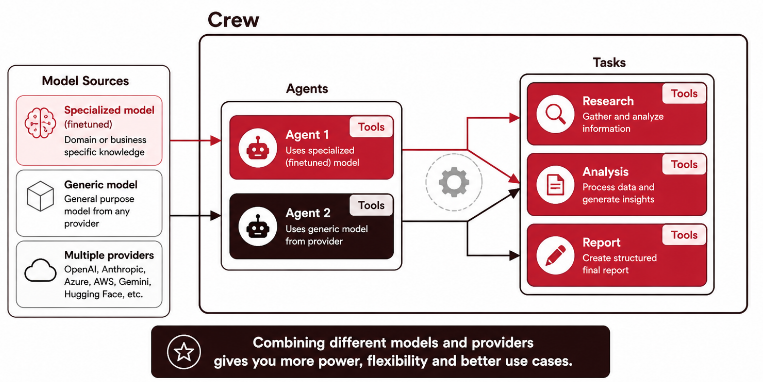
These images explain how CrewAI enables powerful, flexible AI systems by connecting the right models to the right agents and tasks. In the first image, a crew is made up of multiple agents, each equipped with tools and working on specific tasks. Different agents can use different models—specialized (fine-tuned) models for domain-specific expertise or generic models for general tasks—allowing you to tailor performance to each part of the workflow. This setup gives you greater control and power over your use cases.
Build, Run, Deploy, and Integrate
This section explains how to build, run, deploy, and integrate CrewAI systems into production environments. Instead of working only in notebooks, you can create full projects using the CrewAI CLI, which sets up the project structure including agents, tasks, tools, and configuration files.
You can run, test, train, and iterate locally using commands like crewai run, while customizing agents, tasks, and integrations through code and YAML files. Once ready, deployment is done using crewai deploy, which converts your crew into an API endpoint. This allows you to integrate your AI system with external platforms such as Slack, HubSpot, Zapier, or internal tools.
Typical Workflow
1
2
3
4
5
6
crewai create crew trained_agents_crewai
cd trained_agents_crewai
crewai run
crewai test
crewai train
crewai deploy
Production Benefits
- The crew can be exposed as an API.
- External systems can send inputs and receive results.
- Webhooks can notify downstream apps when work is complete.
- Status and input endpoints can support monitoring and orchestration.
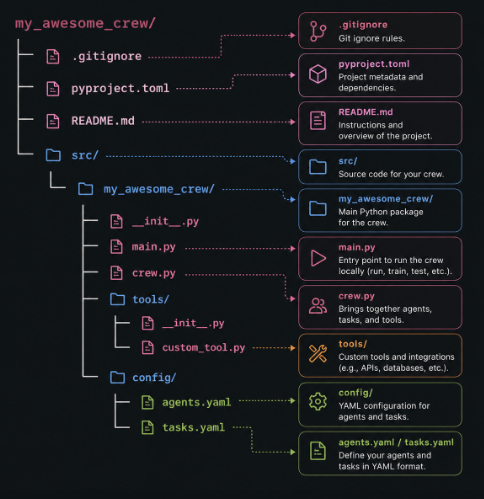
This image presents the typical project structure of a CrewAI application, showing how files and folders are organized to build and manage an AI crew. At the top level, configuration files like .gitignore, pyproject.toml, and README.md handle version control, dependencies, and documentation. The core logic lives inside the src/ directory, where the main package contains key Python files such as main.py (used to run, test, and train the crew) and crew.py (which connects agents, tasks, and tools together). A dedicated tools/ folder is used to define custom integrations like APIs or database connections, while the config/ folder stores YAML files (agents.yaml and tasks.yaml) that define agent roles and task workflows. Overall, this structure separates configuration, logic, and integrations, making the system modular, scalable, and easier to maintain.
You can run, test, train, and iterate locally using commands like crewai run, while customizing agents, tasks, and integrations through code and YAML files. Once ready, deployment is done using crewai deploy, which automatically converts your crew into an API endpoint. This allows you to integrate your AI system with external platforms such as Slack, HubSpot, Zapier, or internal tools. You can send inputs via API requests, receive outputs, and even use webhooks or polling to track progress and trigger actions in other systems.
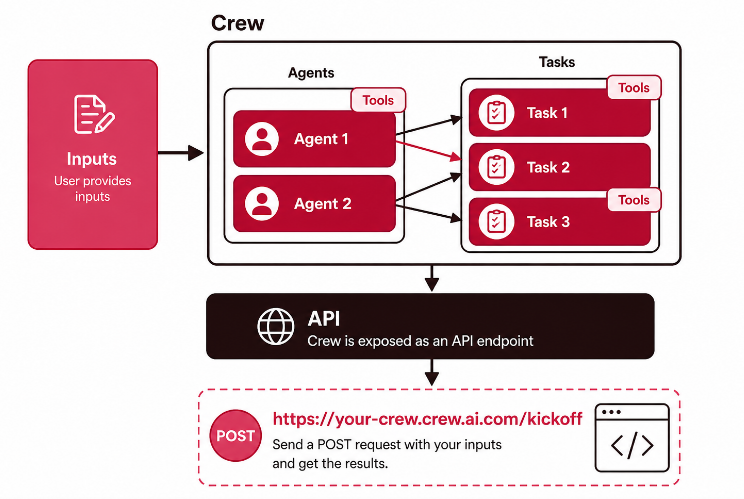
This image illustrates how a CrewAI system is exposed as an API for real-world usage. On the left, user inputs are provided to a crew composed of multiple agents, each responsible for executing specific tasks using available tools. These agents collaborate to process the input and complete the workflow. Once the tasks are executed, the entire crew is wrapped and deployed as an API endpoint, making it accessible from external applications. At the bottom, the diagram shows how users or systems can interact with this API by sending a POST request (e.g., to a /kickoff endpoint) with the required inputs and receiving the results. This setup enables seamless integration of AI workflows into applications, services, or business systems.
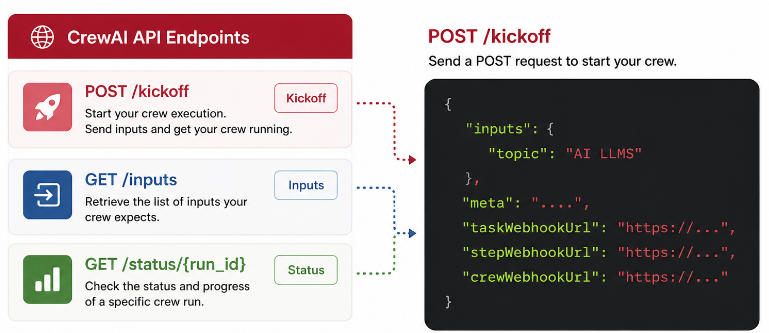
This context explains how a CrewAI system is exposed and used through an API endpoint, specifically the /kickoff endpoint. This endpoint acts as the entry point where you send a POST request containing inputs (e.g., a topic), which are then distributed across agents and tasks in the workflow. In addition to inputs, you can include metadata and configure webhooks to receive updates when tasks, steps, or the entire crew execution is completed. This enables real-time tracking and integration with external systems, such as dashboards or messaging tools.
Beyond the kickoff endpoint, additional endpoints like status and inputs allow you to monitor execution and retrieve information about performance and progress. Overall, this setup transforms your crew into a fully integrated, production-ready service, allowing it to interact with other applications, automate workflows, and deliver results in real-world environments.
Resources
- CrewAI Documentation
- CrewAI Introduction*
- CrewAI Core Concepts
- Practical Multi AI Agents and Advanced Use Cases with CrewAI
GitHub Repository
GitHub Code: Adaptive CrewAI: Learning Through Train-Test-Feedback
GitHub Code: Bank Assistant CrewAI