Adaptive CrewAI: Learning Through Train-Test-Feedback
Project
Table of Contents
- Overview
- Environment Setup
- Run & Stop
- How the Code Is Organized
- System Flow
- What Happens Step-by-Step
- Please provide feedback on the Final Result and the Agent’s actions
- Techniques Used with Applied Examples
- Purpose of
api.py - Error Handling Pattern
- Other Techniques
- Resources
- Project Repository
Overview
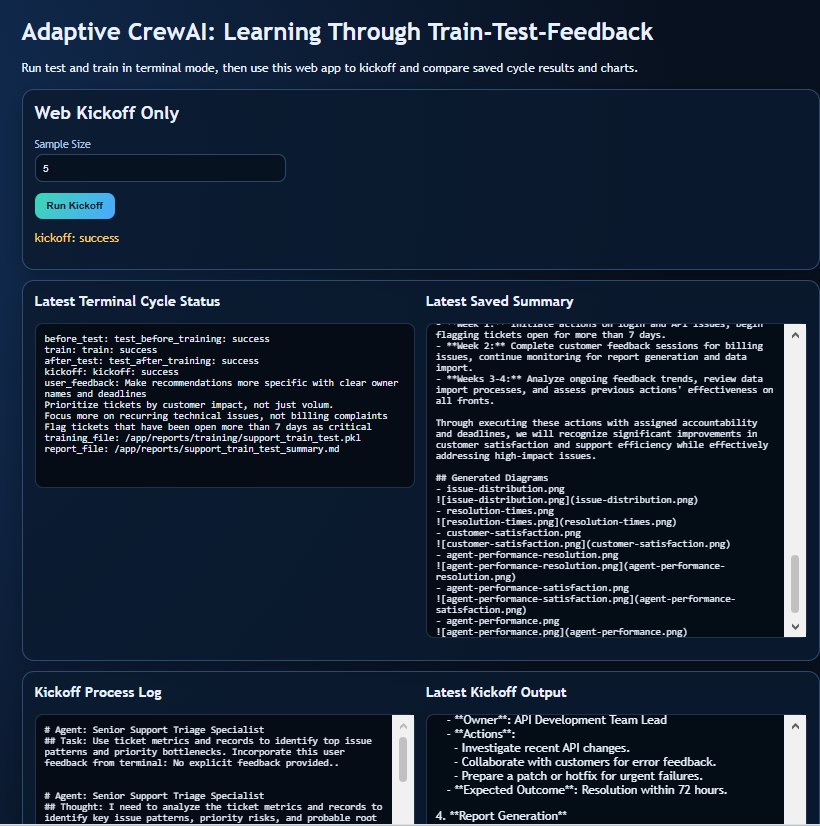
Adaptive CrewAI is a multi-agent AI system built with CrewAI that analyses customer support ticket data. Unlike a static pipeline, this system learns from human feedback: it tests its own performance, asks the operator for feedback in the terminal, trains itself on that feedback, then re-tests to measure improvement. Results are saved to disk and displayed in a live web application.
What it solves
Given a CSV of support tickets, four AI agents collaborate to:
- Identify the most common and highest-priority issue patterns (triage)
- Recommend specific action plans to resolve them (recommend)
- Audit those recommendations for quality and gaps (audit)
- Compile a final management report (report)
The operator watches this happen in the terminal, provides plain-English feedback, and the system trains itself to do it better next time.
Core loop
1
2
3
crew.test()  →  user feedback (terminal)  →  crew.train()  →  crew.test()  →  crew.kickoff()
    ↑                                                                               |
    └────────────────────── results saved → web UI refresh ────────────────────────┘
Environment Setup
Prerequisites
- Python 3.11+
- Docker Desktop (for Docker-based run)
- An OpenAI API key
Step 1 — Create .env
In the project root (Adaptive-CrewAI/), create a file named .env:
1
OPENAI_API_KEY=sk-proj-your-key-here
Step 2 — Install dependencies (local Python only)
1
pip install -r requirements.txt
Key packages used:
| Package | Version | Purpose |
|---|---|---|
crewai |
0.75.0 | Multi-agent orchestration, train/test/kickoff |
crewai_tools |
0.13.2 | BaseTool base class for custom tools |
fastapi |
≥0.115 | REST API backend |
uvicorn |
≥0.30.6 | ASGI server to run FastAPI |
pydantic |
≥2.8.2 | Request/response data validation |
pandas |
≥2.2.2 | CSV loading and data aggregation |
matplotlib / seaborn |
≥3.9 / ≥0.13.2 | Chart generation |
pyyaml |
≥6.0.2 | Loading agent/task YAML configs |
python-dotenv |
≥1.0.1 | Loading .env file into environment |
Step 3 — Docker (recommended)
The docker-compose.yml handles everything:
1
2
3
4
5
6
7
8
dns:
  - 8.8.8.8   # ensures the container can reach api.openai.com
  - 8.8.4.4
volumes:
  - ./src:/app/src         # live-mounted: code changes apply without rebuild
  - ./frontend:/app/frontend
  - ./data:/app/data
  - ./reports:/app/reports # results written here persist on your machine
The Dockerfile:
- Uses
python:3.11-slimas base image - Sets
PYTHONPATH=/app/srcsosupport_train_test_crewis importable - Exposes port
8010 - Starts with:
uvicorn support_train_test_crew.api:app --host 0.0.0.0 --port 8010
Run & Stop
Start (Docker)
1
docker compose up --build -d
Open the web UI: http://localhost:8010
Stop
1
docker compose down
Run the train/test cycle (terminal)
1
2
3
4
docker compose exec support-train-test-web python -m support_train_test_crew.main \
  --iterations 1 \
  --model gpt-4o-mini \
  --sample-size 5
Non-interactive (CI / scripted)
1
2
3
4
docker compose exec support-train-test-web python -m support_train_test_crew.main \
  --iterations 1 --model gpt-4o-mini --sample-size 5 \
  --feedback "Focus on SLA breaches and recurring billing issues" \
  --no-prompt-feedback
Check logs
1
docker compose logs -f support-train-test-web
How the Code Is Organized
1
2
3
4
5
6
7
8
9
10
11
12
13
14
15
16
17
18
19
20
21
22
23
24
25
26
27
28
29
30
31
32
33
34
35
36
37
38
39
40
Adaptive-CrewAI/
│
├── .env                          # OPENAI_API_KEY (not committed)
├── docker-compose.yml            # Service definition with DNS + volume mounts
├── Dockerfile                    # Python 3.11-slim, installs deps, runs uvicorn
├── requirements.txt              # All Python dependencies
│
├── data/
│   └── support_tickets_data.csv  # Input: support ticket records
│
├── frontend/
│   ├── index.html                # Single-page web UI
│   ├── app.js                    # Fetch API calls, DOM rendering, chart modal
│   └── style.css                 # Styling
│
├── reports/
│   ├── support_train_test_summary.md       # Written after each CLI cycle
│   └── training/
│       ├── support_train_test.pkl          # CrewAI saved training weights
│       └── latest_cycle_results.json       # Full result payload (loaded by web UI)
│
└── src/
    └── support_train_test_crew/
        │
        ├── __init__.py
        ├── __main__.py           # Allows: python -m support_train_test_crew
        │
        ├── main.py               # CLI entry point — parses args, calls run_train_test_cycle()
        ├── api.py                # FastAPI app — /health, /run/kickoff, /results/latest
        ├── crew.py               # Builds Crew, Agents, Tasks from YAML
        ├── train_and_test.py     # Orchestrates the full test→feedback→train→test cycle
        ├── report_charts.py      # Generates 6 PNG charts from the CSV data
        │
        ├── config/
        │   ├── agents.yaml       # Agent roles, goals, backstories
        │   └── tasks.yaml        # Task descriptions with {terminal_feedback} injection
        │
        └── tools/
            ├── __init__.py
            └── custom_tool.py    # TicketStatsTool — reads CSV, returns stats summary
System Flow
1
2
3
4
5
6
7
8
9
10
11
12
13
14
15
16
17
18
19
20
21
22
23
24
25
26
27
28
29
30
31
32
33
34
35
36
37
38
39
40
41
42
43
┌─────────────────────────────────────────────────────────────────┐
│                         TERMINAL OPERATOR                        │
│  runs: python -m support_train_test_crew.main --iterations 1    │
└────────────────────────────┬────────────────────────────────────┘
                             │
                    main.py parses CLI args
                             │
                             ▼
              ┌──────────────────────────┐
              │   run_train_test_cycle() │   train_and_test.py
              └──────────────┬───────────┘
                             │
          ┌──────────────────┼──────────────────┐
          │                  │                  │
          ▼                  ▼                  ▼
   crew.test()    _collect_terminal_feedback()  crew.train()
  (before score)    (operator types feedback)   (saves .pkl)
          │                                     │
          └──────────────┬──────────────────────┘
                         │
                    crew.test()
                  (after score — compare)
                         │
                    crew.kickoff()
                  (final live run)
                         │
               generate_report_charts()
                         │
               _build_summary()  +  _write_latest_results()
                         │
               ┌─────────▼─────────┐
               │  reports/ folder  │
               │  *.md  *.json     │
               │  *.png (6 charts) │
               └─────────┬─────────┘
                         │
              Browser refresh → GET /results/latest
                         │
              ┌──────────▼──────────┐
              │    Web UI (8010)    │
              │  status + summary   │
              │  + chart gallery    │
              └─────────────────────┘
What Happens Step-by-Step
Step 1 — Parse CLI arguments (main.py)
argparse reads --iterations, --model, --sample-size, --feedback,
--no-prompt-feedback and passes them to run_train_test_cycle().
Step 2 — Prepare inputs (train_and_test.py)
default_inputs() builds a dictionary with:
project_name— display labelsample_size— how many ticket rows to includedataset_path— absolute path to the CSVterminal_feedback— filled in after user input (Step 3)
Step 3 — Collect terminal feedback
If prompt_feedback=True, the terminal prompts:
1
2
3
4
[cycle] Please enter training feedback for the model.
feedback> Make recommendations more specific with deadlines
feedback> Focus on billing ticket clusters
feedback>    ← empty line finishes input
The text is stored and injected as {terminal_feedback} into every task description.
Step 4 — Pre-training test (crew.test())
Runs the full 4-task pipeline and scores the output. Scores are printed to the terminal.
The result is captured and saved in before_test_output.
Step 5 — Training (crew.train())
CrewAI runs the crew for n_iterations training iterations. After each task completes,
it prompts:
1
## Please provide feedback on the Final Result and the Agent's actions.
This is CrewAI’s built-in prompt — answer on a single line. With --iterations 1 and
4 tasks, there are 4 prompts total. Answers are used to update agent behaviour stored
in support_train_test.pkl.
Step 6 — Post-training test (crew.test())
Runs the same pipeline again and scores output. Comparison with Step 4 shows whether the training improved performance.
Step 7 — Kickoff (crew.kickoff())
Runs the crew one final time with the trained weights. Returns the full report text.
Step 8 — Generate charts (report_charts.py)
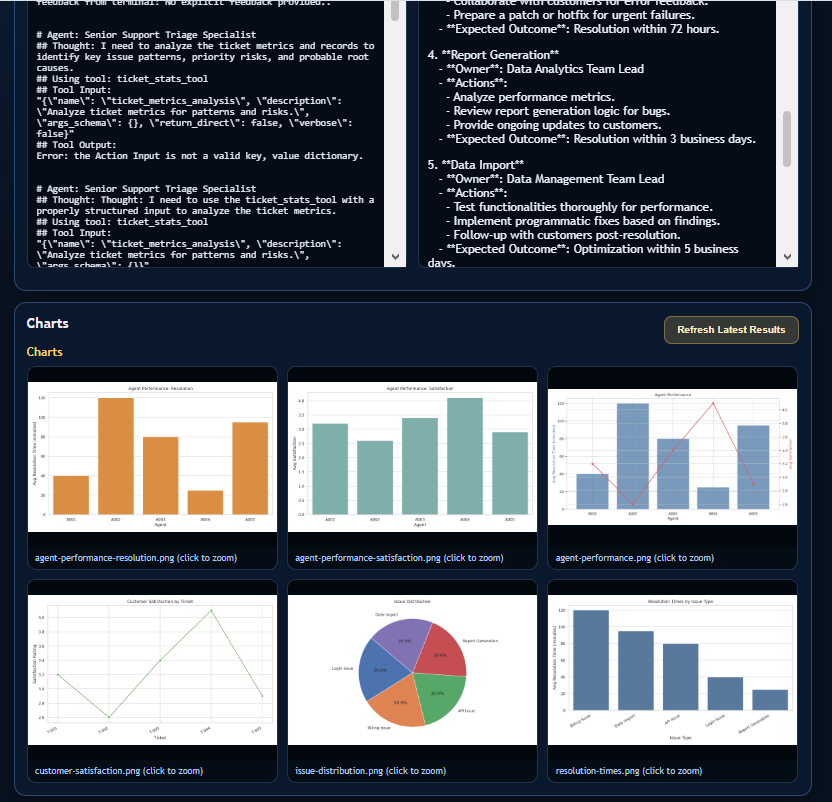
Reads the CSV and writes 6 PNG files to reports/:
issue-distribution.pngresolution-times.pngcustomer-satisfaction.pngagent-performance-resolution.pngagent-performance-satisfaction.pngagent-performance.png
Step 9 — Save artifacts
_build_summary()writes the Markdown summary toreports/support_train_test_summary.md_write_latest_results()writes the full JSON payload toreports/training/latest_cycle_results.json
Step 10 — Web refresh
The browser calls GET /results/latest, which reads both files and returns them as JSON.
The frontend renders cycle status, summary text, user feedback, and the chart gallery.
Techniques Used with Applied Examples
1. Designing Agents
Agents are defined in config/agents.yaml. Each agent has three defining fields:
| Field | Purpose |
|---|---|
role |
Job title shown to the model as its persona |
goal |
What the agent is trying to achieve |
backstory |
Contextual background that shapes tone and reasoning |
Example — ticket_triage_agent:
1
2
3
4
ticket_triage_agent:
  role: "Senior Support Triage Specialist"
  goal: "Classify incoming tickets and identify risk hot spots"
  backstory: "An experienced support operations lead who prioritizes based on impact and urgency."
In crew.py, agents are loaded dynamically from YAML and instantiated as crewai.Agent:
1
2
3
4
5
6
7
agents[name] = Agent(
    role=cfg["role"],
    goal=cfg["goal"],
    backstory=cfg["backstory"],
    verbose=cfg.get("verbose", True),
    tools=tools,   # TicketStatsTool only for ticket_triage_agent
)
Design principle: each agent has a single responsibility (triage, recommend, audit, report) so outputs are focused and composable.
2. Using Tools
TicketStatsTool is a custom BaseTool subclass that the ticket_triage_agent uses
to read real data from the CSV at runtime.
1
2
3
4
5
6
7
8
9
10
11
12
13
class TicketStatsTool(BaseTool):
    name: str = "ticket_stats_tool"
    description: str = "Summarize support ticket CSV metrics for triage and planning."

    def _run(self) -> str:
        df = pd.read_csv(csv_path)
        return (
            f"Total tickets: {total}\n"
            f"Average resolution time: {avg_resolution} minutes\n"
            f"Average satisfaction: {avg_satisfaction} / 5\n"
            f"Tickets by priority: {by_priority}\n"
            f"Tickets by issue: {by_issue}"
        )
Why a tool instead of just putting data in the prompt? Tools are invoked on-demand by the agent. The agent decides when to call the tool during its reasoning chain. This mirrors how a real analyst would look up data rather than having all numbers pre-loaded in memory.
Only the ticket_triage_agent receives this tool — downstream agents receive the
triage output via the task context chain instead.
3. Building the Crew
create_support_train_test_crew() in crew.py reads both YAML files and wires
everything together:
1
2
3
4
5
6
7
return Crew(
    agents=list(agents.values()),
    tasks=tasks,
    process=Process.sequential,   # tasks run in order, each feeding the next
    verbose=True,
    memory=False,
)
Task context chaining — tasks declare their dependencies in YAML:
1
2
3
recommend_resolutions:
  context:
    - triage_tickets     # receives triage output automatically
In Python this becomes:
1
task_context = [task_lookup[key] for key in cfg.get("context", []) if key in task_lookup]
This means action_recommender_agent sees the triage results before writing
its recommendations, and quality_auditor_agent sees recommendations before auditing.
Sequential process ensures deterministic ordering:
triage → recommend → audit → compile_report
4. Testing Before Training
1
2
3
4
5
6
before_eval = _call_with_log(
    "test_before_training",
    crew.test,
    n_iterations=iterations,
    openai_model_name=model,
)
crew.test() is a CrewAI method that runs the crew and produces a numerical quality
score. Capturing this before training gives a baseline to compare against. The result
is stored as before_test_status and before_test_output in the final payload.
5. Collecting Terminal Feedback
1
2
3
4
5
6
7
8
def _collect_terminal_feedback(default_feedback: str = "") -> str:
    lines: list[str] = []
    while True:
        line = input("feedback> ").strip()
        if not line:
            break
        lines.append(line)
    return "\n".join(lines) if lines else default_feedback.strip()
The feedback is then injected into the inputs dict:
1
inputs["terminal_feedback"] = user_feedback
Every task description in tasks.yaml contains {terminal_feedback}:
1
2
triage_tickets:
  description: "...Incorporate this user feedback from terminal: {terminal_feedback}."
CrewAI substitutes {terminal_feedback} at runtime, so the agents literally read the
operator’s words as part of their task instructions.
6. Training with Feedback
1
2
3
4
5
6
7
train_eval = _call_with_log(
    "train",
    crew.train,
    n_iterations=iterations,
    filename=str(TRAINED_FILE),   # saves to reports/training/support_train_test.pkl
    inputs=inputs,
)
crew.train() is a CrewAI method that:
- Runs the full crew pipeline for
n_iterations - After each task, asks the operator:
## Please provide feedback on the Final Result - Uses that feedback as a reinforcement signal to adjust agent behaviour
- Saves the trained state to a
.pklfile
stdout is tee-written using _TeeWriter so the feedback prompts appear in the
terminal while also being captured in a log buffer:
1
2
3
4
5
6
class _TeeWriter:
    def write(self, data: str) -> int:
        for stream in self._streams:
            stream.write(data)
            stream.flush()
        return len(data)
Without this, redirect_stdout would hide prompts and the run would appear frozen.
7. Testing After Training
1
2
3
4
5
6
after_eval = _call_with_log(
    "test_after_training",
    crew.test,
    n_iterations=iterations,
    openai_model_name=model,
)
Identical to Step 7.4. Comparing before_test_status vs after_test_status in the
web UI and summary file shows whether training improved agent performance.
8. Generating Charts
generate_report_charts() uses pandas for aggregation and matplotlib + seaborn
for rendering. Six charts are produced:
| Chart | Type | Data |
|---|---|---|
issue-distribution.png |
Pie | Ticket count per issue type |
resolution-times.png |
Bar (seaborn) | Avg resolution minutes per issue type |
customer-satisfaction.png |
Line (seaborn) | Satisfaction score per ticket |
agent-performance-resolution.png |
Bar | Avg resolution per synthetic agent |
agent-performance-satisfaction.png |
Bar | Avg satisfaction per synthetic agent |
agent-performance.png |
Dual-axis bar+line | Both metrics per agent on one chart |
Synthetic agent IDs are assigned when the CSV has no agent column:
1
work["agent_id"] = [f"A{(i % 5) + 1:03d}" for i in range(len(work))]
This cycles 5 agents (A001–A005) across all rows so the charts always render.
Purpose of api.py
api.py is the FastAPI backend that serves both the web application and the data
the frontend needs.
Why FastAPI?
- Async-ready, fast, and minimal boilerplate
- Pydantic models provide automatic input validation
- Built-in static file serving via
StaticFilesandFileResponse
Endpoints
| Method | Route | What it does |
|---|---|---|
GET /health |
Liveness check for Docker healthcheck and load balancers | |
POST /run/kickoff |
Runs run_kickoff_only(), returns cleaned process log + final report |
|
GET /results/latest |
Loads latest_cycle_results.json + summary + chart file list |
|
GET / |
Serves frontend/index.html |
|
GET /frontend/* |
Serves CSS, JS via StaticFiles |
|
GET /report-files/* |
Serves PNG charts from reports/ via StaticFiles |
ANSI cleaning in the API
CrewAI prints colorized terminal output. When that text is returned to the browser
it shows as raw escape codes ([1m[95m). Both api.py and train_and_test.py
strip them using:
1
2
_ANSI_RE = re.compile(r"\x1b\[[0-9;]*[A-Za-z]|\x1b\([A-Za-z]")
_ANSI_RE.sub("", text)
Request model with validation
1
2
class CycleRequest(BaseModel):
    sample_size: int = Field(default=5, ge=1, le=100)
Pydantic rejects any request where sample_size < 1 or sample_size > 100
with a descriptive 422 error — no manual validation code needed.
CORS middleware
1
app.add_middleware(CORSMiddleware, allow_origins=["*"], ...)
Allows the frontend to call the API even when served from a different origin (e.g. during local development without Docker).
Error Handling Pattern
The project uses a consistent pattern across all long-running operations:
1
2
3
4
5
6
7
try:
    result = crew.kickoff(inputs=inputs)
    kickoff_output = _strip_ansi(str(result))
    kickoff_status = "kickoff: success"
except Exception as exc:              # noqa: BLE001
    kickoff_output = f"Kickoff failed: {exc}"
    kickoff_status = f"kickoff: failed ({exc})"
Key properties of this pattern:
-
Never crashes the outer cycle — if kickoff fails, train/test results and charts are still saved. The web UI shows what succeeded.
-
Status strings are always set —
kickoff_status,train_status, etc. are always strings (neverNone), making them safe to display in the UI without extra null checks. -
_call_with_log()wraps all crew calls — captures stdout, strips ANSI, returns a normalized dict withok,status,log, anderrorkeys regardless of outcome. -
_read_latest_results()handles missing/corrupt files — returns{"available": False, "message": "..."}rather than raising, so the web UI always gets a renderable response even on the first run. -
Chart generation is isolated — wrapped in its own
try/exceptso a chart rendering failure does not block the summary or JSON result from being saved.
Other Techniques
Dynamic YAML-driven configuration
Agents and tasks are fully defined in YAML — no Python code changes are needed to
modify agent goals, add tasks, or reorder the pipeline. The loader in crew.py
reads any YAML structure at runtime:
1
2
for name, cfg in agent_cfg.items():
    agents[name] = Agent(role=cfg["role"], goal=cfg["goal"], ...)
This makes the system easy to reconfigure without touching business logic.
Template variable injection into prompts
Task descriptions use {variable} placeholders:
1
description: "...Incorporate this user feedback: {terminal_feedback}."
CrewAI substitutes these from the inputs dict at runtime. This is what makes terminal feedback reach the agents, no prompt engineering in Python code required.
Stdout tee-writing for interactive CLI
_TeeWriter multiplexes stdout to both the real terminal and an io.StringIO buffer
simultaneously. This solves a core problem: redirect_stdout alone would hide
CrewAI’s interactive prompts (causing apparent hangs), but writing to both streams
keeps them visible while still capturing the log.
Volume-mounted source code in Docker
The docker-compose.yml mounts ./src, ./frontend, ./data, and ./reports
as live volumes. This means:
- Code changes in
src/apply immediately after a container restart (no rebuild) - Charts and results written inside the container appear directly in
reports/on the host - The web UI files in
frontend/update without rebuilding the image
Separation of CLI and web paths
main.py → run_train_test_cycle() (terminal, interactive, saves artifacts)
api.py → run_kickoff_only() (web, non-interactive, returns JSON)
This ensures the web server never hangs waiting for terminal input, while the CLI path remains fully interactive.
Chart URL mapping in the API
1
result["chart_urls"] = [f"/report-files/{name}" for name in result.get("chart_files", [])]
File names from the disk scan are converted to HTTP-accessible URLs on the fly.
The frontend uses these URLs directly in <img> tags — no base64 encoding or
additional endpoints needed.
Persistent training weights
crew.train() saves agent training state to a .pkl file. On subsequent runs,
CrewAI loads this file automatically, meaning each training session builds on
previous ones rather than starting from scratch.
Resources
Project repository
GitHub Code: Adaptive CrewAI: Learning Through Train-Test-Feedback