Multi-Agent Banking Workflows with CrewAI
Project
Table of Contents
- Overview
- Environment Setup & Run/Stop
- System Flow
- How the Code Is Organized
- What Happens Step-by-Step
- Customer Support and Advisory Executor
- Advisory + Sales Flow Executor
- Content Pipeline Executor
- Techniques Used with Applied Examples
- Resources
- Project Repository
Overview
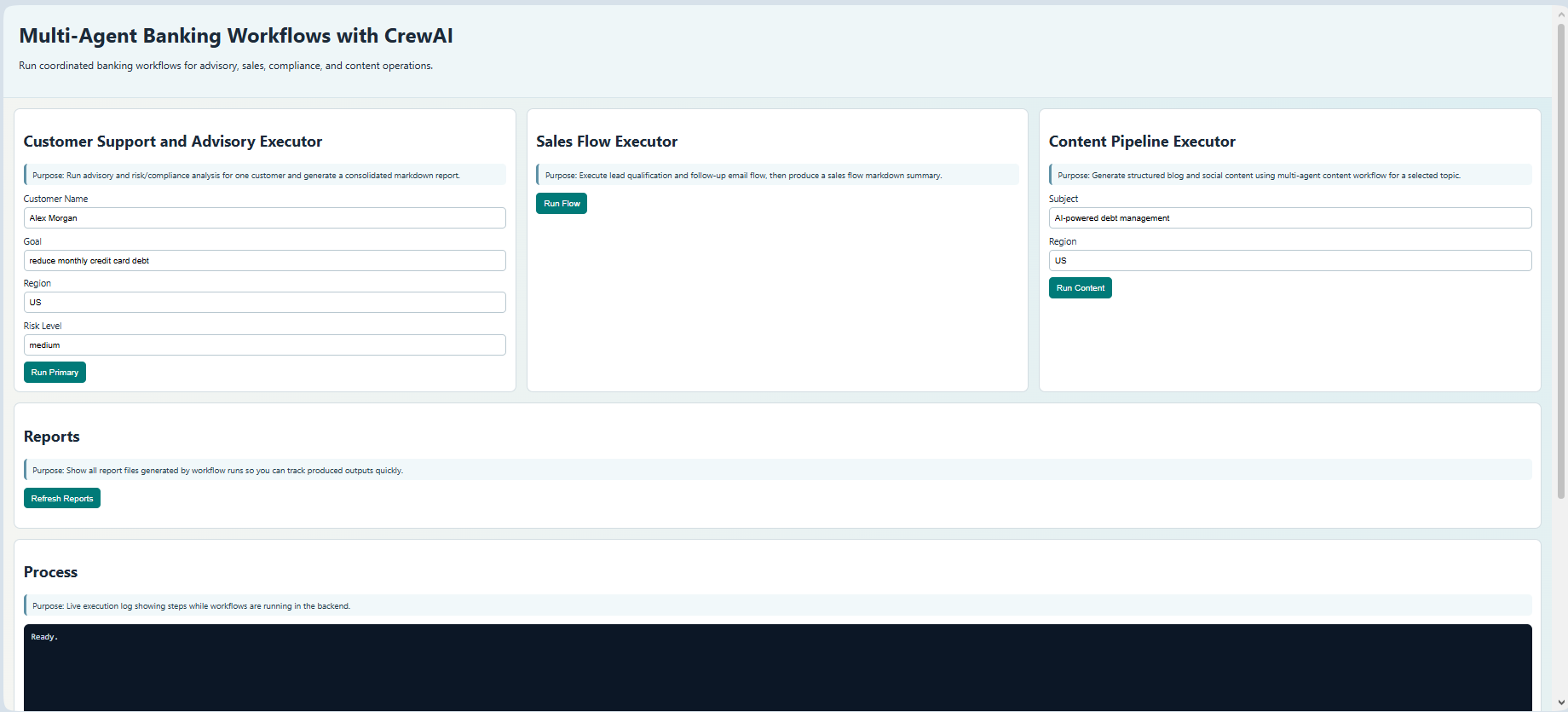
This project is a workflow-first multi-agent banking system built with CrewAI. It is designed around specialized executors instead of a single conversational chatbot.
Main executors in the web UI:
- Customer Support and Advisory Executor
- Sales Flow Executor
- Content Pipeline Executor
Core capabilities:
- YAML-driven agent and task definitions
- Structured outputs with Pydantic models
- Multi-step flow orchestration across crews
- Tool-based data access (CSV-backed tools)
- FastAPI backend + static frontend UI
- Dockerized runtime
Environment Setup & Run/Stop
Prerequisites
- Python 3.10+
- Docker Desktop (optional, recommended)
- OpenAI API key in
.env
Local Setup (without Docker)
1
pip install -r requirements.txt
Create .env in project root:
OPENAI_API_KEY=your_key_here
OPENAI_MODEL_NAME=name_of_model
BANK_ALT_LLM=name_of_model
BANK_MARKET_LLM=name_of_model
BANK_CREATOR_LLM=name_of_model
BANK_QA_LLM=name_of_model
Run API:
1
uvicorn bank_assistant_crew.api:app --host 0.0.0.0 --port 8000
Docker Run
1
docker compose up --build
1
docker compose down
System Flow
End-to-end system behavior:
- User clicks an executor button in frontend.
- Frontend calls backend route:
POST /run/primaryPOST /run/flowPOST /run/content
- Backend runs CrewAI workflow or Flow.
- Workflow reads config from
src/bank_assistant_crew/config/*.yaml. - Agents execute tasks, optionally with tools and structured outputs.
- Report artifacts are written to
reports/. - Backend normalizes result into user-friendly markdown.
- Frontend renders markdown in Final Report panel.
How the Code Is Organized
1
2
3
4
5
6
7
8
9
10
11
12
13
14
15
16
17
18
19
20
21
22
23
24
25
26
27
28
29
30
31
32
33
34
35
36
37
Bank-Assistant-CrewAI/
  Dockerfile
  docker-compose.yml
  README.md
  PROJECT_WORKFLOW_GUIDE.md
  frontend/
    index.html
    app.js
    style.css
  data/
    customers.csv
    transactions.csv
    support_tickets.csv
  reports/
    .gitkeep
  src/
    bank_assistant_crew/
      api.py
      main.py
      sales_flow.py
      flow_kickoff.py
      content_pipeline.py
      crew.py
      models.py
      tools/
        custom_tool.py
      config/
        agents.yaml
        tasks.yaml
        risk_compliance_agents.yaml
        risk_compliance_tasks.yaml
        bank_lead_qualification_agents.yaml
        bank_lead_qualification_tasks.yaml
        bank_email_engagement_agents.yaml
        bank_email_engagement_tasks.yaml
        bank_content_agents.yaml
        bank_content_tasks.yaml
What Happens Step-by-Step
A) Customer Support and Advisory run
- API receives
/run/primarypayload (customer, goal, region, risk level). run_primary_workflows(...)executes:- Advisory and service crew
- Risk and compliance crew
- Outputs are written to
reports/bank_assistant_summary.md. - API normalizes output to markdown sections and returns to frontend.
B) Sales Flow run
- API receives
/run/flow. - Flow starts at
fetch_leads(). - Lead qualification crew scores each lead.
- High-priority leads are filtered (
lead_score >= 70). - Email engagement crew generates follow-up emails.
- Summary is saved to
reports/bank_sales_flow_output.json. - API returns a markdown report built from saved output.
C) Content Pipeline run
- API receives
/run/content. - Content crew executes trend -> audience -> creation -> QA tasks.
- Outputs are saved to:
reports/bank_blog_post.mdreports/bank_social_posts.mdreports/bank_content_output.json
- API composes a normalized markdown report (blog + social posts).
Customer Support and Advisory Executor
Important code (primary workflow orchestration):
1
2
3
4
5
6
7
8
9
10
11
12
13
14
# src/bank_assistant_crew/main.py
advisory_result = run_workflow(
    CONFIG_DIR / "agents.yaml",
    CONFIG_DIR / "tasks.yaml",
    inputs,
    "Workflow 1: Customer Advisory and Service",
)

risk_result = run_workflow(
    CONFIG_DIR / "risk_compliance_agents.yaml",
    CONFIG_DIR / "risk_compliance_tasks.yaml",
    inputs,
    "Workflow 2: Risk and Compliance Validation",
)
Important code (markdown normalization for UI):
1
2
3
4
5
6
7
8
# src/bank_assistant_crew/api.py
final_markdown = "\n\n".join(
    [
        "# Customer Support and Advisory Report",
        "## Advisory and Service Workflow\n" + (advisory_text or "No advisory output generated."),
        "## Risk and Compliance Workflow\n" + (risk_text or "No risk output generated."),
    ]
)
Advisory + Sales Flow Executor
Important code (flow chaining across steps):
1
2
3
4
5
6
7
8
9
10
11
12
13
14
15
16
17
18
19
20
21
# src/bank_assistant_crew/sales_flow.py
@start()
def fetch_leads(self):
    return [{"lead_data": {...}}, {"lead_data": {...}}]

@listen(fetch_leads)
def score_leads(self, leads):
    lead_scoring_crew = create_bank_lead_qualification_crew({"pipeline_batch": leads})
    scores = lead_scoring_crew.kickoff_for_each(leads)
    return scores

@listen(score_leads)
def filter_leads(self, scores):
    normalized = [...]
    high_priority = [item for item in normalized if item.get("lead_score", 75) >= 70]
    return high_priority

@listen(filter_leads)
def write_email(self, qualified_leads):
    email_writing_crew = create_bank_email_engagement_crew(email_payload[0])
    return email_writing_crew.kickoff_for_each(email_payload)
Important code (cross-crew context preservation):
1
2
3
4
5
6
7
# src/bank_assistant_crew/sales_flow.py
self.state["source_leads"] = [lead.get("lead_data", {}) for lead in leads]

# later: backfill missing fields from source context
for key in ["name", "region", "goal", "segment", "job_title", "email", "preferred_channel"]:
    if key not in flat and key in source_lead:
        flat[key] = source_lead[key]
Content Pipeline Executor
Important code (model routing by agent):
1
2
3
4
5
6
7
# src/bank_assistant_crew/content_pipeline.py
model_map = {
    "market_trends_agent": market_model,
    "audience_insights_agent": strategy_model,
    "content_creator_agent": creator_model,
    "quality_assurance_agent": qa_model,
}
Important code (task assignment and structured output):
1
2
3
4
5
6
7
8
# src/bank_assistant_crew/content_pipeline.py
task_kwargs = {
    "description": cfg["description"].format(subject=subject, region=region),
    "expected_output": cfg["expected_output"].format(subject=subject, region=region),
    "agent": agents[task_agent_map[task_name]],
}
if task_name == "create_bank_content":
    task_kwargs["output_pydantic"] = ContentOutput
Important code (final markdown formatting for user readability):
1
2
3
4
5
6
7
8
9
10
# src/bank_assistant_crew/api.py
lines = [
    "# Content Pipeline Report",
    "",
    "## Blog Post",
    "",
    blog_post or "No blog post generated.",
    "",
    "## Social Posts",
]
Techniques Used with Applied Examples:
Technique 1: Every agent has Role, Goal, Backstory
Applied in YAML agent configs.
1
2
3
4
5
# src/bank_assistant_crew/config/agents.yaml
customer_intake_agent:
  role: Senior Customer Intake Specialist
  goal: Understand customer intent, current financial profile, and immediate support needs.
  backstory: You are an experienced front-office banking specialist...
Technique 2: Agents in crews pull/push data from systems and connect multiple crews
Applied with tools and cross-crew orchestration.
Pull data via tool:
1
2
3
4
5
# src/bank_assistant_crew/tools/custom_tool.py
class CustomerDataFetcherTool(BaseTool):
    def _run(self, customer_id: str = "", full_name: str = "") -> str:
        customers = pd.read_csv(DATA_DIR / "customers.csv")
        return json.dumps(rows.to_dict(orient="records"), indent=2)
Connect multiple crews:
1
2
3
4
5
6
# src/bank_assistant_crew/sales_flow.py
lead_scoring_crew = create_bank_lead_qualification_crew({"pipeline_batch": leads})
scores = lead_scoring_crew.kickoff_for_each(leads)

email_writing_crew = create_bank_email_engagement_crew(email_payload[0])
emails = email_writing_crew.kickoff_for_each(email_payload)
Push outputs to artifacts:
1
2
3
# src/bank_assistant_crew/content_pipeline.py
blog_md.write_text(output.get("blog_post", ""), encoding="utf-8")
json_out.write_text(json.dumps(output, indent=2), encoding="utf-8")
Technique 3: Task dependencies managed via context in multi-step workflow
Applied through sequential tasks, flow listeners, and shared state context.
Flow dependency chain:
1
2
3
4
5
6
7
8
9
10
11
12
# src/bank_assistant_crew/sales_flow.py
@listen(fetch_leads)
def score_leads(...):
    ...

@listen(score_leads)
def filter_leads(...):
    ...

@listen(filter_leads)
def write_email(...):
    ...
State context between steps:
1
2
3
# src/bank_assistant_crew/sales_flow.py
self.state["source_leads"] = [...]  # set context
source_leads = self.state.get("source_leads", [])  # consume context later
Sequential dependency inside crew:
1
2
3
4
5
6
7
# src/bank_assistant_crew/crew.py
Crew(
  agents=list(agents.values()),
  tasks=tasks,
  process=Process.sequential,
  verbose=True,
)
Technique 4: Agents use tools for grounded data and external signals
Yes. In this project, specific agents are explicitly equipped with tools, while others run without tools.
Example 1: Lead data agent gets customer, transaction, and support-ticket tools.
1
2
3
4
5
6
7
8
9
10
# src/bank_assistant_crew/crew.py
if key == "lead_data_agent":
    agent_tools = [CustomerDataFetcherTool(), TransactionDataFetcherTool(), SupportTicketFetcherTool()]

agents[key] = Agent(
    role=cfg["role"],
    goal=cfg["goal"],
    backstory=cfg["backstory"],
    tools=agent_tools,
)
Example 2: Market trends agent gets a trend-signal tool in content pipeline.
1
2
3
4
5
6
7
8
9
10
11
# src/bank_assistant_crew/content_pipeline.py
if key == "market_trends_agent":
    agent_tools = [BankingTrendSignalTool()]

agents[key] = Agent(
    role=cfg["role"],
    goal=cfg["goal"],
    backstory=cfg["backstory"],
    llm=model_map.get(key),
    tools=agent_tools,
)
Tool implementation pattern used in this project:
1
2
3
4
5
6
7
8
# src/bank_assistant_crew/tools/custom_tool.py
class CustomerDataFetcherTool(BaseTool):
    name: str = "Customer Data Fetcher"
    description: str = "Fetch customer records by customer_id or partial full_name from local CSV data."

    def _run(self, customer_id: str = "", full_name: str = "") -> str:
        customers = pd.read_csv(DATA_DIR / "customers.csv")
        return json.dumps(customers.to_dict(orient="records"), indent=2)
Technique 5: Purpose of api.py
api.py is the backend entry point for the web app. It does four main jobs:
- Defines API request models (classes) for input validation.
- Runs project workflows (primary, content, sales flow).
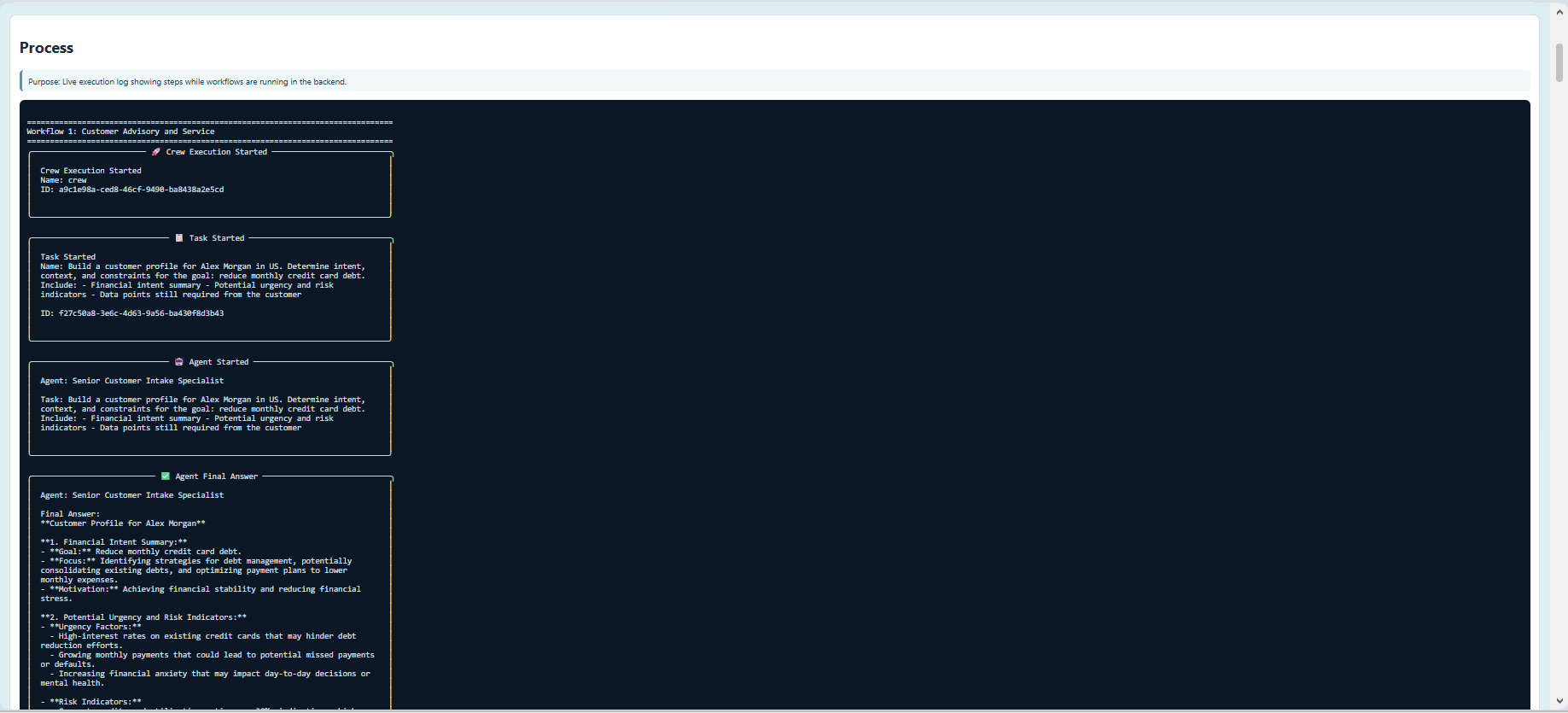
- Captures and formats logs/results so frontend can display friendly reports.
- Exposes HTTP endpoints (
@app.get,@app.post) for frontend and monitoring.
5-1) Global Objects and App Setup
app = FastAPI(...)
Creates the web API application instance.
CORS middleware
Allows the frontend to call backend endpoints from browser clients.
ROOT, FRONTEND_DIR
Path helpers used to serve static UI files and read report artifacts.
JOBS and JOBS_LOCK
JOBS: in-memory dictionary storing async job status/results.JOBS_LOCK: thread lock to safely read/write job data across threads.
5-2) Classes in api.py
PrimaryRequest(BaseModel)
Request schema for primary workflow endpoints.
Fields:
customer_namecustomer_goalregionrisk_level
Why it exists:
- Validates incoming JSON body.
- Provides default values for testing/demo.
ContentRequest(BaseModel)
Request schema for content pipeline endpoint.
Fields:
subjectregion
Why it exists:
- Ensures valid payload shape for content generation requests.
_LiveJobWriter(io.TextIOBase)
Internal helper class used to stream workflow logs into JOBS[job_id]["process_log"] in real-time.
Methods:
write(text): appends new logs to the job record.flush(): no-op flush implementation.
Why it exists:
- Supports progress polling for async job UI.
5-3) Regular Functions (sync)
Log and text helpers
_strip_markdown_fences(text): Removes triple-backtick wrappers from model output._capture_sync(func, *args, **kwargs): Runs a sync function while capturing stdout/stderr._read_if_exists(path_str): Safely reads report files only if they exist.
Structured output parsing helpers
_json_to_markdown(value)_extract_literal_field(text, field_name, stop_fields)_extract_crewoutput_payloads(text)_coerce_structured_value(value)_format_structured_markdown(value)
Why they exist:
- Crew/Flow outputs can arrive as raw strings, JSON strings, dicts, or lists.
- These helpers normalize output into readable markdown for frontend display.
Report builder helpers
_build_sales_flow_markdown(result): Builds sales report sections (summary, high-priority leads, email outputs)._parse_social_posts_from_blog_tail(text)and_parse_social_posts_md(text): Parse social content from markdown/json forms._build_content_markdown(result): Builds content report from blog + social outputs._build_primary_response(result, process_log): Builds final response object for primary workflows.
Async-job launcher helper
_start_primary_job(payload): Creates job record, starts worker thread, runs primary workflow, updates job status.
Status lifecycle used:
queued->running->completed(orfailed).
5-4) Async Functions
_capture_async(func, *args, **kwargs)
Async version of log-capture wrapper.
What it does:
awaits an async workflow function.- Captures stdout/stderr while it runs.
- Returns
(result, process_log).
run_flow() endpoint function (async)
Declared with async def because sales flow kickoff path is async-capable.
It calls:
result, process_log = await _capture_async(run_flow_kickoff)
5-5) @app.get Endpoints
@app.get("/health")
Returns:
1
{"status": "ok"}
Used for service liveness checks and optional Docker health checks.
@app.get("/")
Serves frontend HTML (index.html).
@app.get("/app.js")
Serves frontend JavaScript bundle file.
@app.get("/style.css")
Serves frontend CSS file.
@app.get("/jobs/{job_id}")
Returns current state for a background primary job:
- status
- process_log
- result
- error
- timestamps
@app.get("/reports")
Lists files generated under reports/.
5-6) @app.post Endpoints
@app.post("/run/primary")
Runs primary workflows synchronously and returns:
- title
- process_log
- final_markdown
- details
Use when:
- You want immediate run result in one response.
@app.post("/jobs/primary")
Starts primary workflow in background and immediately returns job id.
Use when:
- Workflow may take longer and frontend needs polling.
@app.post("/run/content")
Runs content pipeline synchronously. Returns normalized markdown report for blog + social outputs.
@app.post("/run/flow")
Runs sales flow orchestration (async endpoint function). Returns normalized sales markdown report with lead and email sections.
5-7) Error Handling Pattern
Most endpoints use:
tryworkflow callexcept Exception as excraise HTTPException(status_code=500, detail=str(exc))
Why:
- Converts internal exceptions into explicit API error responses frontend can display.
5-8) End-to-End Request Example
For POST /run/primary:
- Request body is validated by
PrimaryRequest. - Workflow runs via
run_primary_workflows(...). - Stdout/stderr logs are captured.
- Output is normalized and formatted for readability.
- JSON response returns
final_markdown+detailsfor frontend rendering.
Resources
Project repository
GitHub Code: Bank Assistant CrewAI