Automated Medical Case Review System with LangGraph
Project
Table of Contents
- Overview
- Environment Setup & Run/Stop
- System Flow
- How the Code Is Organized
- What Happens Step-by-Step
- Techniques Used with Applied Examples
- LangGraph Workflow & Agents
- LangGraph Workflow Patterns Used
- Core Steps in the Workflow
- Workflow Block Diagram (Pseudo-Mermaid)
- Resources
- Project Repository
Overview
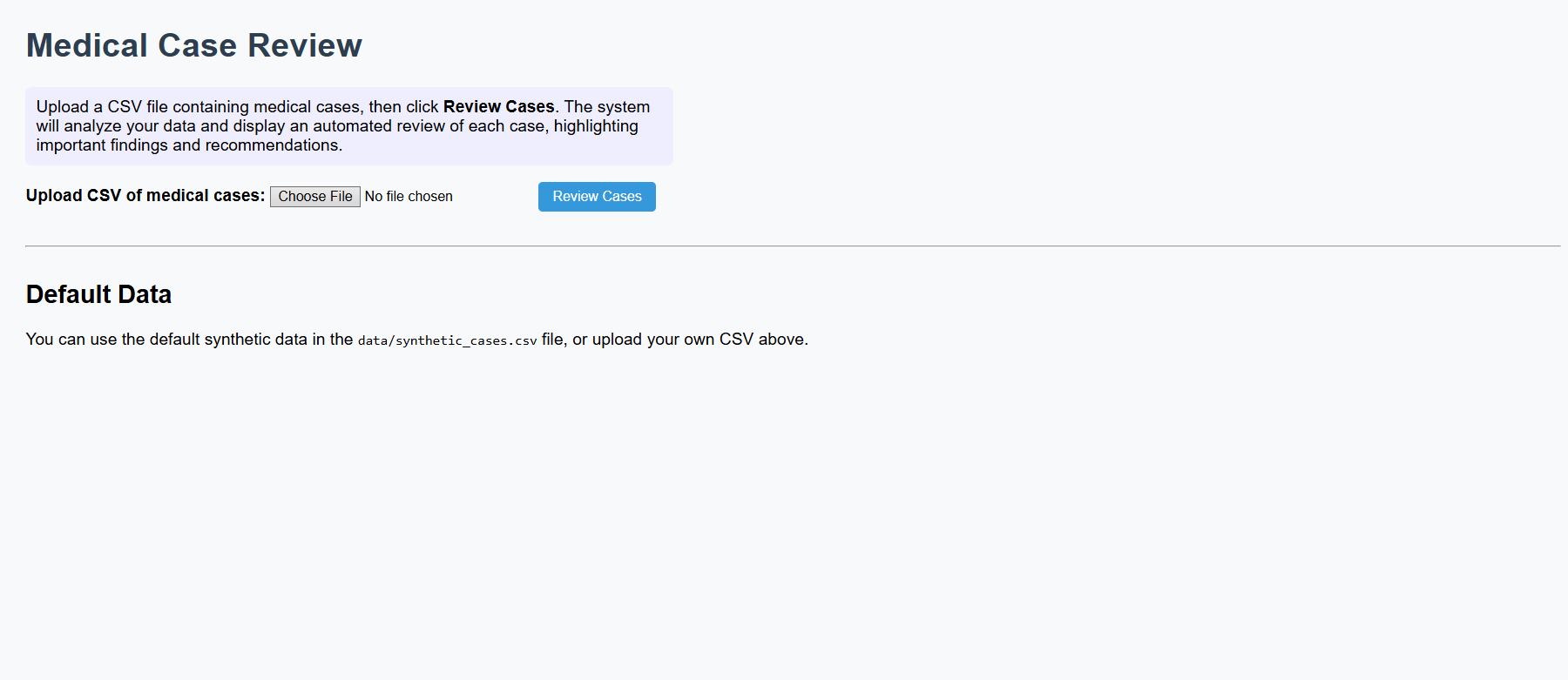
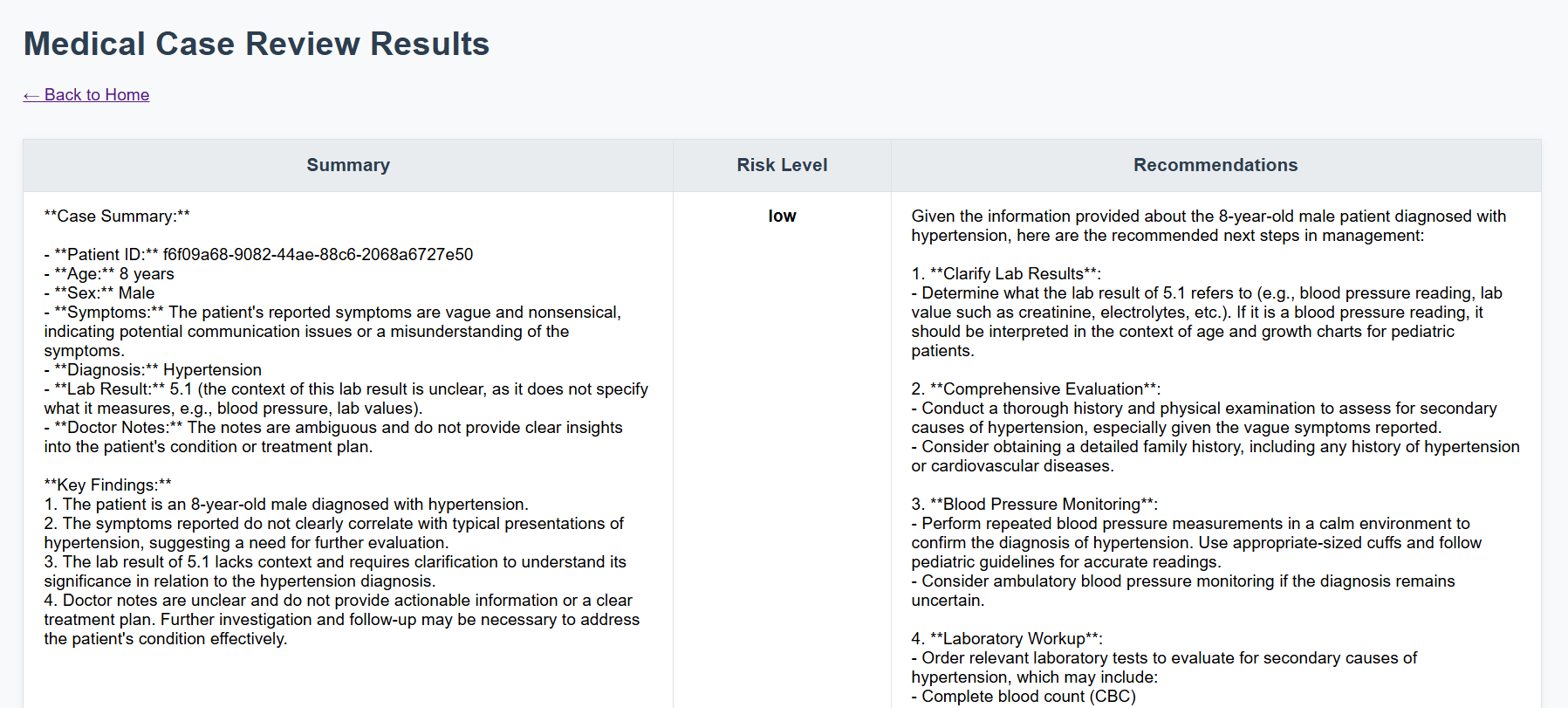
This project is an Automated Medical Case Review System that leverages LangGraph and OpenAI LLMs to automate the review of medical cases. Users upload a CSV file of cases, and the system provides a summary, risk assessment, and recommendations for each case. The workflow is orchestrated using LangGraph, which enables modular, agent-based, and iterative processing.
Environment Setup & Run/Stop
Prerequisites
- Docker and Docker Compose (recommended)
- Python 3.11+ (for local development)
Run with Docker
Build Docker
1
docker-compose up --build
- Access the app at: http://localhost:8000
Stop Docker
1
docker-compose down
Run Locally (without Docker)
1
2
pip install -r requirements.txt
uvicorn main:app --reload
System Flow
The following steps outline how the automated medical case review system processes each uploaded file, from initial data input to final results displayed in the web interface.
- User uploads a CSV file (or uses default synthetic data).
- Backend parses the CSV and iterates through each case.
- Each case is processed by the LangGraph workflow:
- Summarization
- Risk evaluation
- Recommendations
- Feedback loop for high-risk cases
- Results are rendered in the web interface.
How the Code Is Organized
1
2
3
4
5
6
7
8
9
medical_case_review-app/
├── main.py                  # FastAPI web server, handles routes and file uploads
├── case_review_workflow.py  # Defines the LangGraph workflow, LLM prompts, and review logic
├── templates/               # HTML templates for the UI
├── static/                  # CSS and static files
├── data/                    # Synthetic data or user-uploaded CSV files
├── requirements.txt         # Python dependencies
├── Dockerfile               # Containerization
└── docker-compose.yml       # Containerization
What Happens Step-by-Step
- User uploads CSV via the web form.
- FastAPI endpoint
/reviewreceives the file and loads it into a pandas DataFrame. - For each row (case):
- A
Caseobject is created. - The workflow is invoked with the case state.
- The workflow:
- Summarizes the case using an LLM prompt.
- Evaluates risk (low/moderate/high) using another LLM prompt.
- Generates recommendations using a third LLM prompt.
- If risk is high, a feedback loop can repeat the review up to a limit.
- The result is collected.
- A
- All results are rendered in
results.html.
Techniques Used with Applied Examples
- LangGraph: Orchestrates the workflow as a directed graph of steps (nodes) and transitions (edges).
- LLM Prompt Chaining: Each review step uses a different prompt and LLM call.
- Feedback Loop: The workflow can repeat review steps for high-risk cases.
- FastAPI: Provides the web server and handles HTTP requests.
- Docker: Ensures consistent deployment.
Example: Workflow Node Definition
The following code demonstrates how the main workflow nodes and transitions are defined using LangGraph. Each node represents a key processing step, and conditional edges control the flow based on review outcomes.
1
2
3
4
5
6
7
8
9
10
11
12
13
# In case_review_workflow.py

graph = StateGraph(CaseState)
graph.add_node("review_case", review_case)
graph.add_node("feedback_loop", feedback_loop)
graph.add_edge(START, "review_case")
graph.add_edge("review_case", "feedback_loop")
graph.add_conditional_edges(
    "feedback_loop",
    lambda state: route_review(state),
    {"Accepted": END, "Needs Review": "review_case"}
)
case_review_workflow = graph.compile()
Example: LLM Prompt Usage
This example shows how a prompt template is constructed and used to instruct the LLM to summarize a medical case. The prompt provides clear system and user instructions, ensuring the model focuses on the most relevant information.
1
2
3
4
5
summary_prompt = ChatPromptTemplate.from_messages([
    ("system", "You are a medical reviewer. Summarize the case and highlight key findings."),
    ("user", "Case: {case}")
])
summary = summary_prompt | llm
LangGraph Workflow & Agents
This section explains how LangGraph structures the workflow as a network of modular agents, each responsible for a specific task. Understanding these components helps clarify how the system processes and transitions between different steps.
- Nodes: Each function (e.g.,
review_case,feedback_loop) is a node. - Edges: Define the flow between nodes, including conditional transitions.
- State: Passed between nodes, updated at each step.
- Agents: Each node can be seen as an agent performing a specific task (summarization, risk evaluation, recommendation, etc).
LangGraph Workflow Patterns Used
This project leverages several core workflow patterns provided by LangGraph:
1. Sequential Pattern
The workflow processes each case through a fixed sequence of steps: summarization, risk computation, and recommendation. These steps are executed in order within the review_case node, ensuring that each output feeds into the next step.
2. Conditional Pattern
After the feedback loop, the workflow uses a conditional edge to decide the next step based on the review result. If the case is accepted, the workflow ends; if it needs further review, it loops back to the review step. This is implemented with LangGraph’s add_conditional_edges method.
3. Iterative (Feedback Loop) Pattern The workflow can repeat the review process for a case multiple times if the risk remains high. This is an example of an iterative or loop pattern, where the workflow revisits previous steps based on dynamic conditions.
Pattern Summary Table
| Pattern | Where Used | Purpose |
|---|---|---|
| Sequential | review_case node |
Ensures ordered execution of summarization, risk, recommendation |
| Conditional | After feedback_loop |
Routes to END or back to review based on result |
| Iterative | Feedback loop | Allows multiple review cycles for high-risk cases |
These patterns together enable a flexible, agentic, and robust workflow for automated medical case review.
Core Steps in the Workflow
1. Summarization
The review_case node first summarizes the medical case using an LLM prompt. This step extracts and highlights the key findings from the raw case data.
Example code:
1
2
3
4
5
summary_prompt = ChatPromptTemplate.from_messages([
    ("system", "You are a medical reviewer. Summarize the case and highlight key findings."),
    ("user", "Case: {case}")
])
summary = summary_pipe.invoke({"case": case.dict()}).content
2. Risk Computation
After summarization, the workflow evaluates the risk level (low, moderate, high) using another LLM prompt. The risk is determined based on the summary, diagnosis, and lab results.
Example code:
1
2
3
4
5
6
7
8
9
10
11
risk_prompt = ChatPromptTemplate.from_messages([
    ("system", "You are a risk evaluator. Classify the risk as low, moderate, or high and explain why."),
    ("user", "Summary: {summary}\nDiagnosis: {diagnosis}\nLab: {lab_result}")
])
risk = risk_pipe.invoke({
    "summary": summary,
    "diagnosis": case.diagnosis,
    "lab_result": case.lab_result
}).content
# Extract risk level from LLM output
risk_level = "low" if "low" in risk.lower() else ("high" if "high" in risk.lower() else "moderate")
3. Recommendation
Finally, the workflow generates recommendations for next steps in management, using the summary, risk level, and doctor notes as input to the LLM.
Example code:
1
2
3
4
5
6
7
8
9
recommend_prompt = ChatPromptTemplate.from_messages([
    ("system", "You are a senior physician. Give recommendations for next steps in management."),
    ("user", "Summary: {summary}\nRisk: {risk_level}\nNotes: {doctor_notes}")
])
recommendations = recommend_pipe.invoke({
    "summary": summary,
    "risk_level": risk_level,
    "doctor_notes": case.doctor_notes
}).content
These three steps are all performed in the review_case node, and their results are combined into a ReviewResult object that is passed along the workflow.
Workflow Block Diagram (Pseudo-Mermaid)
The following diagram visually summarizes the main workflow logic, showing how cases move through review, feedback, and acceptance or further review cycles.
graph TD
    START --> review_case
    review_case --> feedback_loop
    feedback_loop -- Accepted --> END
    feedback_loop -- Needs Review --> review_case
Note: The arrows labeled -- Accepted --> and -- Needs Review --> represent a conditional edge. After the feedback_loop, the workflow checks the review result: if the case is accepted, the workflow ends; if it needs further review, it loops back to review_case for another iteration. This dynamic routing is implemented using LangGraph’s add_conditional_edges method.
Resources
Project Repository
GitHub Code: Automated Medical Case Review System with Langgraph